DBLab 4.1: protection leases, Teleport, Prometheus, and more

On this page
DBLab 4.0 introduced instant database branching with O(1) economics. With 4.1, we're making it safe to hand off to a platform team: automatic resource governance, enterprise access control, production-safe data refresh, and native observability.
DBLab 4.1 makes database branching safe to hand to a platform team:
- Protection leases auto-expire — no more abandoned clones quietly consuming storage
- Teleport integration brings every ephemeral clone under enterprise access control and audit logging
- rds-refresh keeps clones fresh from RDS/Aurora snapshots without ever touching production
Protection leases: clones that clean up after themselves
DBLab already cleans up idle clones automatically (via maxIdleMinutes). But protected clones are exempt -- that's the point of protection. The problem is engineers protect clones and forget to unprotect them. Disk usage creeps up, somebody has to audit, and the team ends up over-provisioning storage to compensate.
Now protection has a timer. Set a lease when you create a clone -- through the UI or CLI -- and DBLab handles the rest:
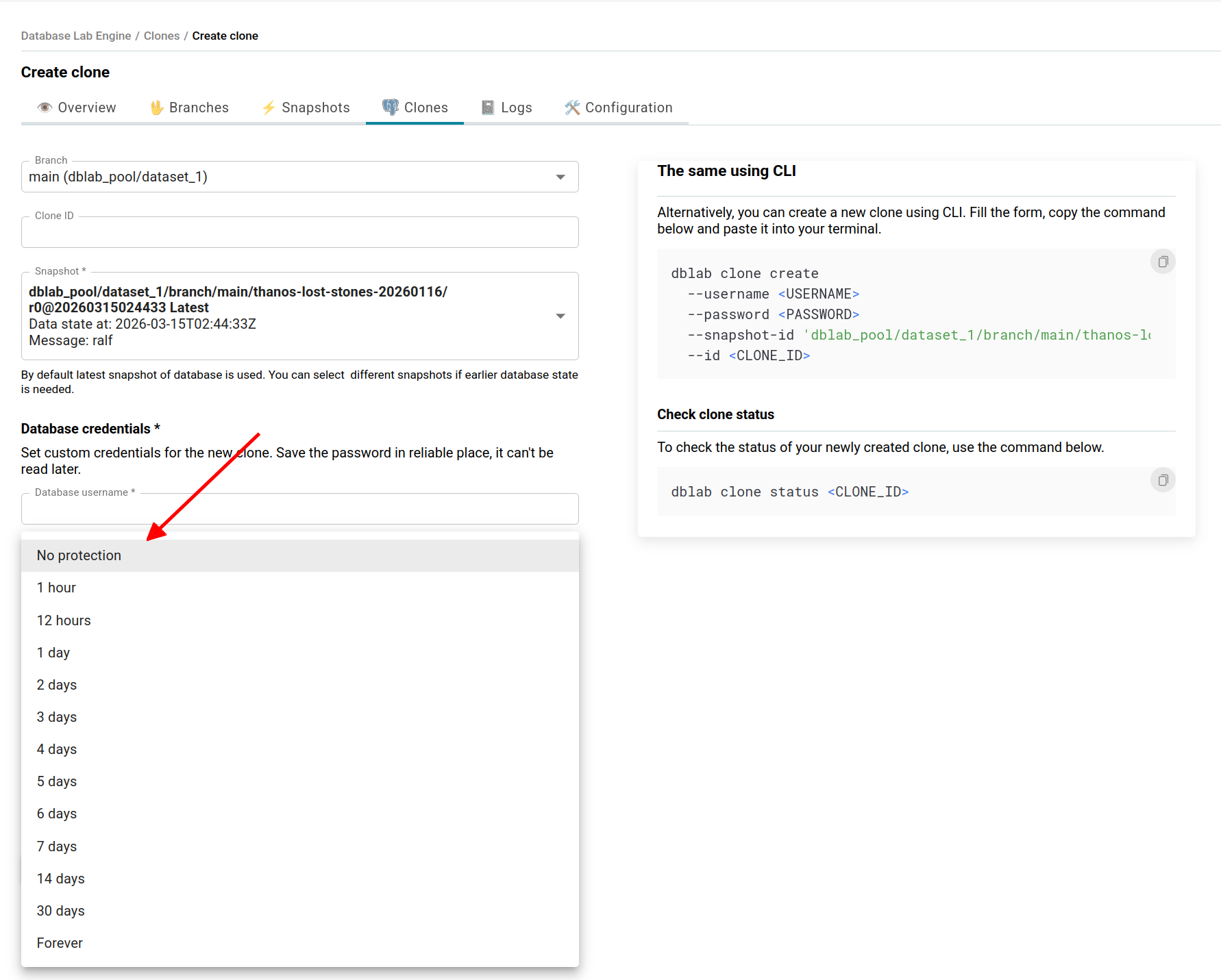
Or using CLI:
dblab clone create \
  --branch main \
  --id ci-migration-test-4521 \
  --protected 120 \
  --username postgres \
  --password "${CI_DB_PASSWORD}"
When the lease expires, protection lifts and idle cleanup reclaims the clone automatically. No human intervention.
Platform teams can set default durations and hard caps server-side, so no clone stays protected longer than policy allows. Before expiration, a webhook fires -- wire it to Slack so clone owners can extend if they're still working.
The result: tighter disk utilization, lower storage costs, and no more "who left this clone running?" audits.
Database rename: no more production names in dev
You clone your production database. The clone keeps the name myapp_production. A developer isn't sure which environment they're querying. This is a real class of bugs.
DBLab 4.1 lets you rename databases during snapshot creation, so every clone gets clean names from the start:
databaseRename:
  myapp_production: myapp
  analytics_prod: analytics
Every clone inherits the renamed databases automatically. No post-creation scripts, no application-side workarounds.
ARM64 and Colima: database branching on your Mac
DBLab now supports Apple Silicon. If you have an M-series Mac, you can build and run DBLab locally with Colima -- no cloud VM required.
Experiment with database branching on a plane, in a secure facility, or while waiting for IT to approve a cloud budget. See the macOS setup guide for step-by-step instructions.
Teleport integration: auditable access for every clone
In regulated environments, every database connection must be logged and access-controlled. Ephemeral clones were historically a gap: they spin up fast, live briefly, and often bypass the controls you'd apply to long-lived databases.
DBLab 4.1 bridges this with native 
 integration. When a clone is created, it automatically registers as a Teleport database resource with role-based access and session recording. When the clone is destroyed, the resource is removed. No more manually setting up SSH tunnels to reach clones -- engineers connect through Teleport like any other database, with every connection logged and access policy-controlled.
Teleport integration requires Standard Edition (SE) or Enterprise Edition (EE).
RDS/Aurora data refresh without touching production
Running pg_dump directly against a production RDS instance is risky: it holds an xmin horizon for the duration of the dump, blocking vacuum and accumulating bloat. In severe cases, you risk transaction ID wraparound.
DBLab 4.1 ships rds-refresh, a standalone tool that gets fresh data into DBLab without ever connecting to production. It finds the latest automated snapshot, creates a temporary RDS instance from it, points DBLab at the temporary instance to refresh, and deletes it when done:
Built-in orphan protection ensures temporary instances are always cleaned up -- even if the process crashes.
The temporary instance typically runs for 3-4 hours. At db.r7g.2xlarge (8 vCPU, 64 GiB RAM), that's roughly $2.60-$3.85 per refresh -- negligible compared to the production risk it eliminates.
Schedule it with cron, Kubernetes CronJob, or ECS Scheduled Task for nightly refreshes. Your developers and CI pipelines always start the day with fresh data.
Parallel dump/restore (-j) is currently configured manually. Automatic parallelism tuning is coming in the next release.
Prometheus metrics: monitor everything, build nothing
DBLab now exposes a /metrics endpoint in Prometheus format -- ready to scrape with no auth or plugins:
- Disk -- total, free, used, snapshot/clone breakdown, compression ratio
- Clones -- count, status, diff size, CPU and memory usage, protected count
- Snapshots -- count, age, data lag, physical and logical size
- Sync -- WAL replay lag, last replayed timestamp (physical mode)
- Instance -- uptime, status, version/edition info
- Branches and datasets -- counts and availability
Add DBLab to your Prometheus config:
scrape_configs:
  - job_name: 'dblab'
    static_configs:
      - targets: ['dblab.internal:2345']
    metrics_path: /metrics
Set up alerts on the metrics that matter most -- disk pressure, stale snapshots, WAL lag -- so you know before things break.
Not using Prometheus? DBLab includes an OpenTelemetry Collector configuration that exports to Grafana Cloud, Datadog, New Relic, or any OTLP-compatible backend.
What's next
- Logical replication for continuous refresh -- keep snapshots updated in real time without full
pg_dumpcycles - ZFS send/recv for instance sync -- replicate data between DBLab instances, including from staging to a developer's laptop
- Major version upgrade testing -- spin up a clone on a newer Postgres version to test upgrades before committing
Get started
Already on 4.0? See the upgrade guide and full changelog.
- Try the demo: demo.dblab.dev (token:
demo-token) - Deploy DBLab SE: AWS Marketplace or Postgres.ai Console
- Install open source: How-to
- macOS setup: Run DBLab on Mac
- Enterprise: Contact [email protected] for DBLab EE
DBLab 4.0 made database branching instant. DBLab 4.1 makes it something you can hand off to a platform team and trust to run itself. Protection leases keep resources in check. Teleport keeps access auditable. Prometheus keeps you informed. And rds-refresh keeps data fresh without risking production.
All of it on top of the O(1) economics that make DBLab unique.
Get Started | GitHub | Join our Slack
Denis Morozov
Staff Engineer at PostgresAI
DBLab Engine
Instant database branching with O(1) economics.