DBLab 4.2: clone upgrades, simplified install, retention, and more


DBLab 4.0 made database branching instant. 4.1 added the controls around it — protection leases, Teleport, metrics. 4.2 closes the last item on 4.1's own roadmap — testing a Postgres major version upgrade on a clone — and removes the two remaining points of friction around it: getting configured in the first place, and cleaning up what accumulates afterwards.
DBLab 4.2 turns the major version upgrade into something you can rehearse:
- Upgrade a single clone to a newer Postgres major in place, on production-like data, without touching the instance or anything else running on it
- New instances configure themselves: paste a source connection URL and password, and DBLab detects the provider, image, databases and settings instead of asking you to know them
- Branches and snapshots now expire on a policy, so storage stops being something somebody has to audit
- Every new feature is opt-in: nothing turns itself on when you upgrade
Clone major upgrade: rehearse the upgrade on real data
Deciding when to move production to a new Postgres major comes down to a question nobody can answer cheaply: what happens to our data? Restoring a production-sized copy just to run pg_upgrade is a project of its own, so the rehearsal gets skipped and the risk moves into the maintenance window.
DBLab 4.2 makes it one command:
dblab clone upgrade my-clone
The clone's Postgres shuts down cleanly, pg_upgrade --link converts its data directory in place, and the clone restarts on the target major. Because --link hard-links rather than copies, the upgrade is fast and costs almost no extra space. The same action is on the clone page in the UI and at POST /clone/{id}/upgrade.
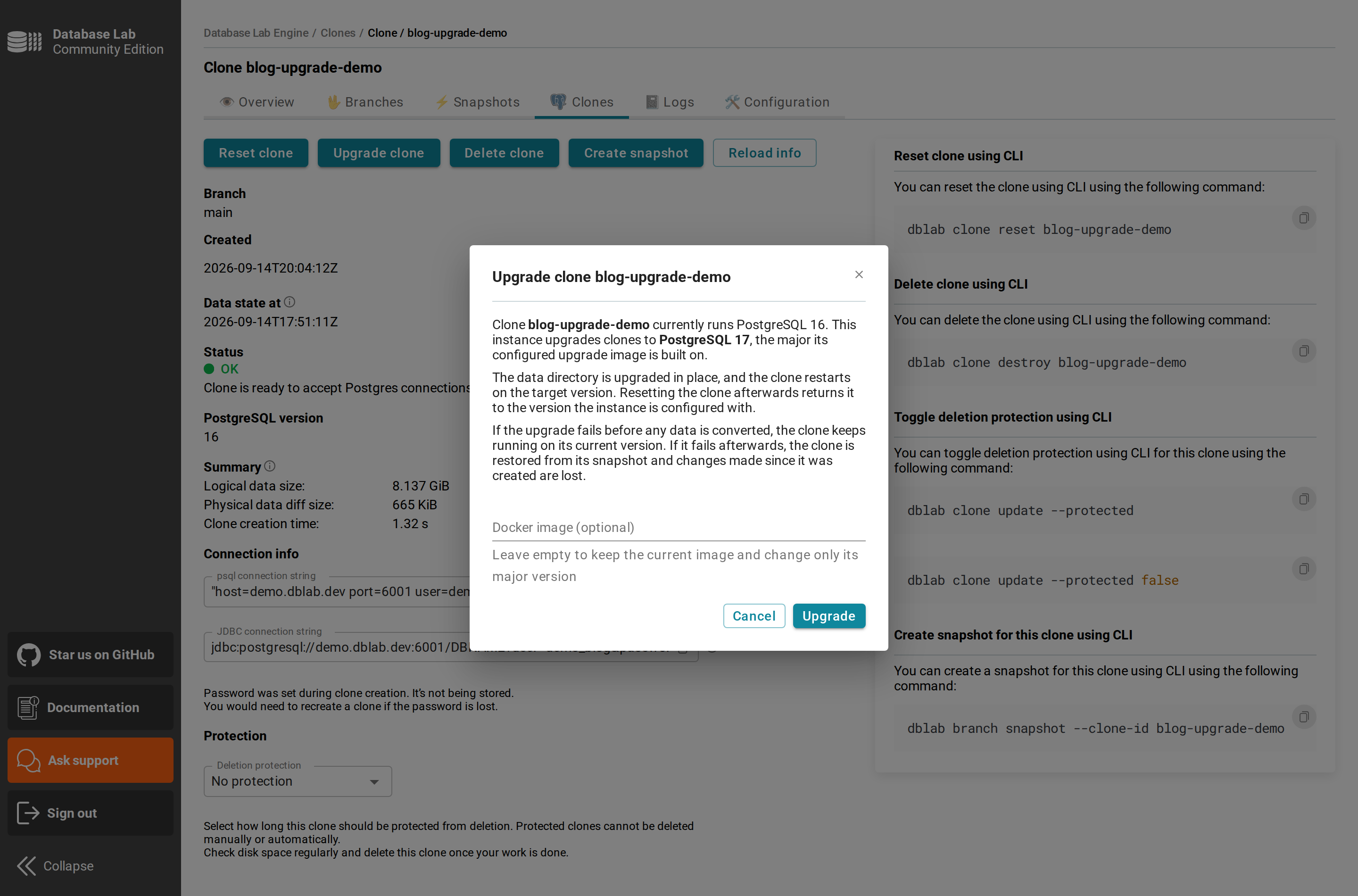
The target version isn't a parameter — it follows from the instance's upgrade image:
provision:
  pgUpgradeImage: "postgresai/pg-upgrade:17"
Leave it unset and the feature is off. A failure before any data is converted leaves the clone running on its original version; after that point the clone is rebuilt from its origin snapshot, losing writes made since it was created. dblab clone reset always returns it to the instance-wide version.
Iteration 1 limitation. A snapshot taken from an upgraded clone doesn't record its major version, so clones made from it fail to start — avoid snapshotting upgraded clones until snapshot-level version resolution lands. See the README for the full set of boundaries.
Simplified install: paste a URL, get a configuration
The fastest way to lose someone evaluating DBLab has always been the first server.yml. It asks you to know which Postgres image matches your source, which databases to dump, and which shared_preload_libraries the source loads — before you have anything working to check your answers against.
On a new, unconfigured instance the UI Configuration page now opens in Simple mode: paste a source URL and password, and the engine connects and proposes the rest — provider (RDS, Aurora, Cloud SQL, Supabase, Azure, Timescale Cloud), Postgres version and matching image, databases, shared_buffers, preload libraries, query tuning. The same detection runs from the terminal:
dblab local-install \
  --source-url 'postgresql://[email protected]:5432/app?sslmode=require' \
  --password "$PGPASSWORD" --start
Detection is a starting point, not a verdict — every value has an override flag. Expert mode keeps full control and now covers WAL-G and pgBackRest fields too. Hand-editing server.yml remains supported.
Retention: branches and snapshots that expire on policy
4.1 gave clones a protection lease so they would stop accumulating. Branches and snapshots had no equivalent: a branch created for a CI run stayed until someone deleted it, and the storage report was where you found out.
retention:
  unusedSnapshotMinutes: 0   # auto-delete a snapshot unused for N minutes; 0 = disabled
  unusedBranchMinutes: 0     # same for branches
  maxDeletionsPerTick: 50    # excess deferred to the next sweep
The sweep is deliberately timid: anything with clones, child branches or snapshots, or active protection is never removed, and nothing is force-deleted to make room. Both settings default to 0, so upgrading changes nothing until you opt in.
Protection uses the clone grammar, now on branches and snapshots — dblab branch my-branch --protected 7d, or the new PATCH /branch/{name} and PATCH /snapshot/{id}:
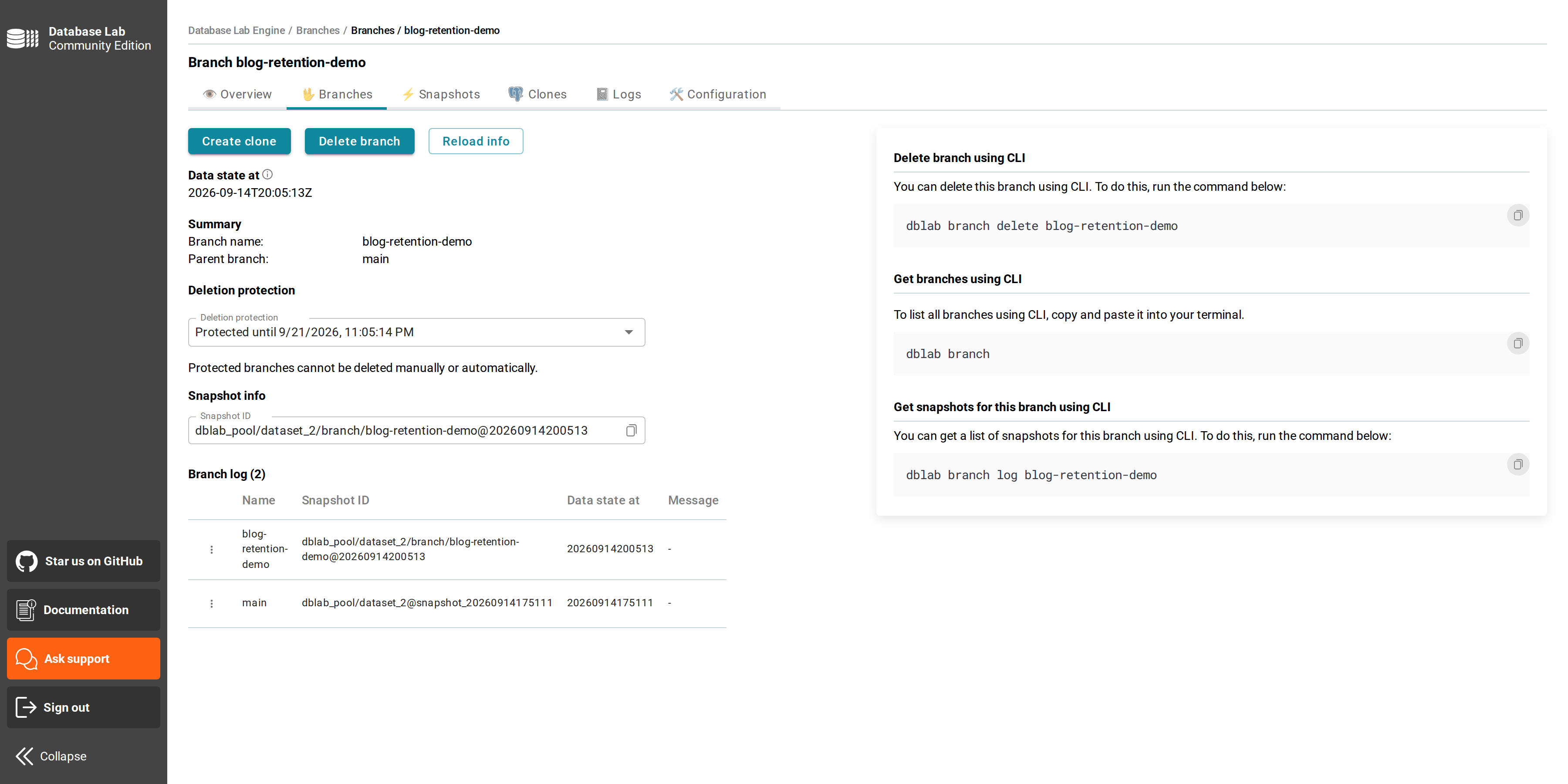
Protected branches are skipped by the retention sweep and can't be deleted manually.
Secrets out of the config file
A DBLab config has always had to hold a source password, and usually S3 or WAL-G credentials too. Now any value that is exactly ${VAR} or $VAR is replaced from the environment when the config is read:
server:
  verificationToken: "${DBLAB_VERIFICATION_TOKEN}"
Only a whole value is a placeholder, so a $ inside a password or a regex still reaches its consumer untouched. An unset variable is a startup failure — a config that silently loses its verification token is worse than one that refuses to start.
Teleport: per-user clone access
4.1 brought clones under Teleport, so every connection was authenticated and recorded. But a role granting access to DBLab resources granted access to every clone — fine for a small team, awkward the moment clones carry data not everyone should see.
platform:
  enablePersonalTokens: true
  bindClonesToUser: true
A clone created with a personal token is now labeled dblab_user: <email>, taken from the authenticated identity and not from a clone-create parameter. A Teleport role can then match dblab_user: ['{{external.email}}']. The clone's Postgres username is unchanged, so existing connection strings, Joe and CI keep working. Sidecar resources also accept operator-defined --labels.
Teleport integration requires Standard Edition (SE) or Enterprise Edition (EE).
Physical retrieval: extra flags without dropping to customTool
WAL-G and pgBackRest expose some options only as command-line flags — --mask, --restore-spec, --restore-only. Needing one used to mean abandoning the built-in integration for customTool and reimplementing the restore yourself.
walg:
  backupName: LATEST
  customOptions:
    - "--restore-only=mydb"
Anything that has a WALG_* variable still belongs in envs; customOptions is for what doesn't.
Faster clone creation
Clone provisioning used to end with a recursive chown -R over the whole cloned dataset — work identical for every clone of the same snapshot, and the dominant cost on large databases.
4.2 normalizes ownership once, when the snapshot is prepared. In our own A/B run on a 421,306-file snapshot with a cold cache, clone creation went from 22.7 s to 11.3 s. Forcing the old path back on the same build reproduced the original timing exactly, so the whole difference is the skipped chown. The win scales with file count.
Also in 4.2
- Engine —
containerConfig.volumeentries apply as bind mounts to retrieval containers; the engine stops stacking a dump-directory mount on every start and warns about nested or stacked mounts with recovery steps. - UI — branch data state time renders in UTC instead of the browser's timezone; clone status polling stops when you leave the page; dark-theme fixes for the snapshot calendar and instance tabs.
- Teleport — clone IDs containing characters Teleport rejects in resource names now map to hyphens instead of failing to register silently.
- Security — the Go runtime and the Docker client dependency are moved onto current, patched versions, and image scans now block the build rather than warn. The changelog lists the individual advisories.
What's next
- Logical replication for continuous refresh — keep snapshots updated in real time without full
pg_dumpcycles - ZFS send/recv for instance sync — replicate between DBLab instances, including staging to a developer's laptop
- Snapshot-level version resolution — so snapshots from upgraded clones carry their major and clone normally
Get started
Already on 4.1? See the upgrade guide and the full changelog. No 4.2 feature turns itself on — but note one prerequisite: the *-zfs0.8 server images are gone, so hosts still on ZFS 0.8 (stock Ubuntu 18.04/20.04) must move to ZFS 2.x first.
- Try the demo: demo.dblab.dev (token:
demo-token) — now running 4.2 - Deploy DBLab SE: AWS Marketplace or Postgres.ai Console
- Install open source: How-to
- Enterprise: Contact [email protected] for DBLab EE
DBLab 4.0 made branching instant. 4.1 added the controls. 4.2 makes it something you can point at a real question — what does Postgres 17 do to our data? — and answer it the same afternoon, on a clone that costs nothing to throw away.
All of it on top of the O(1) economics that make DBLab unique.
Get Started | GitHub | Join our Slack
Denis Morozov
Staff Engineer at PostgresAI

DBLab Engine
Instant database branching with O(1) economics.