DBLab vs Cloud SQL cloning
thin clones vs a new Cloud SQL instance
Cloud SQL cloning creates a new, independent Cloud SQL instance from an existing one. DBLab serves many thin clones of any PostgreSQL from one machine you control.
Where DBLab is ahead of Cloud SQL cloning
Each point pairs what our documentation says with what the Cloud SQL cloning documentation says. Follow the links and check.
Clones the Postgres you already run
DBLabAny PostgreSQL from version 10 up, wherever it runs: Amazon RDS, Aurora, Cloud SQL, Supabase or your own servers. docsdocs 2
Cloud SQL cloningCloud SQL cloning copies Cloud SQL instances. Google's clone FAQ: "You can't clone a database to another project" and "You can't clone a replica." 1
One copy of the data, many clones
The whole database, in seconds
DBLabA clone takes a few seconds whatever the database size: under 2 seconds for a 10 TiB database with one user. docsdocs 2
Cloud SQL cloningA standard Cloud SQL clone takes time proportional to database size, "hours for large databases." Fast clone creation steps take seconds to minutes, but fast clone runs only in the source's zone with matching disk properties, and not for a point-in-time clone. 1
The data stays on a machine you control
Short answer
Cloud SQL cloning creates a new Cloud SQL for PostgreSQL instance that is independent of the source, with the same settings and database users; point-in-time recovery uses the same mechanism. Each clone is a full instance with its own machine and storage. DBLab Engine is open-source software that keeps one copy of any PostgreSQL, including Cloud SQL, on a machine you run and gives many people thin clones of it in seconds. For a standalone full copy or a recovery inside Cloud SQL, cloning is built in. For many copies at once on one machine, DBLab fits.
When Cloud SQL cloning is the better choice
- Built into Cloud SQL, with no other software or server to run. The clone is an ordinary Cloud SQL instance managed by Google Cloud.
- Fast clone, used in the same zone when disk properties match, is a metadata-only operation: "the size of the data does not affect the clone creation time."
- Google states that cloning has no performance impact on the source instance, and the clone gets its own machine, so tests do not share resources with other copies.
- Clones from an earlier point in time through point-in-time recovery, with logs kept up to 7 days on Enterprise and up to 35 days on Enterprise Plus.
- Database flags, connectivity, machine type and database users with their passwords are copied, so a clone is ready to use like the source.
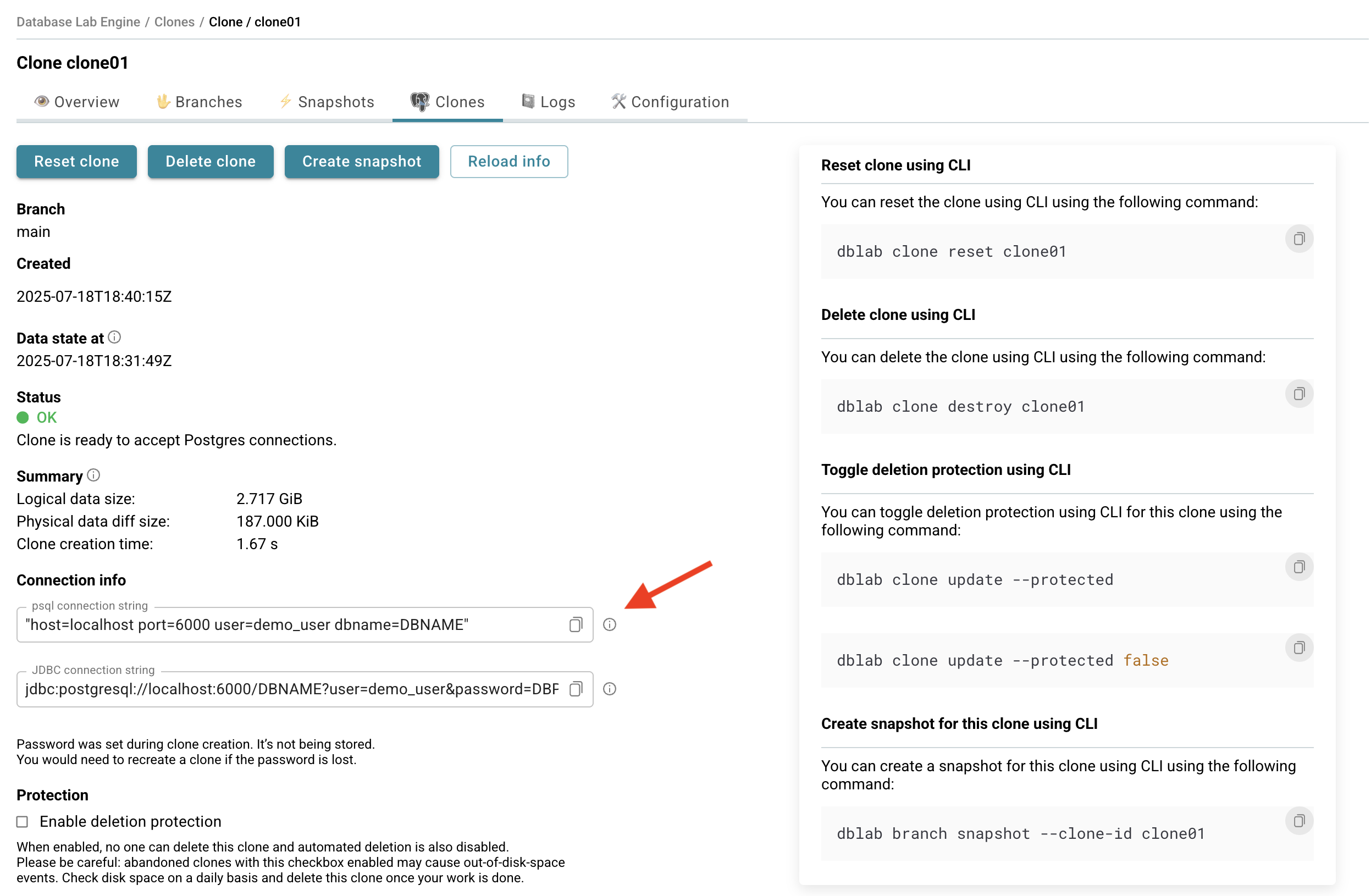
What you get
A clone in the DBLab UI, ready for connections 1.67 seconds after it was requested (a 2.7 GiB demo database). How it works
DBLab and Cloud SQL cloning, side by side
| Question | DBLab | Cloud SQL cloning |
|---|---|---|
| What it is | Open-source software that gives every developer, CI job and AI agent a writable, full-size copy of a PostgreSQL database in seconds. Thin clones share one physical copy of the data on one machine. docsdocs 2 | A Cloud SQL operation that creates a new instance "completely independent from the source instance", with the same settings such as database flags, connectivity and machine type, and the same database users. Point-in-time recovery uses cloning to restore an instance from an earlier point in time. 12 |
| Which databases it can copy | YesAny PostgreSQL from version 10 up, wherever it runs. Managed services such as Amazon RDS, Aurora, Cloud SQL and Supabase are copied with dump and restore; self-managed servers can also be copied physically with WAL-G, pgBackRest or pg_basebackup. docsdocs 2 | PartlyClones Cloud SQL instances in the same Google Cloud project. Google's FAQ: you can't clone a database to another project, and you can't clone a replica. A clone of a clone is allowed. 1 |
| How a copy is made | Copy-on-write in the file system, with ZFS or LVM. Clones share unchanged blocks, so a clone takes extra disk space only for what it changes. docs | Two workflows. Standard clone "creates a full backup of the source instance" and builds the new instance from it. Fast clone "takes an Instant Snapshot" and creates the new disk from it; Cloud SQL uses it when the clone is made in the source's zone without specifying a zone, and disk properties match. A point-in-time clone uses the standard workflow. 1 |
| Time to get a copy | A few seconds whatever the database size: under 2 seconds for a 10 TiB database with one user, up to 30 seconds with 15 users at once. The first copy of the source is slow; about 1 TiB an hour is a good speed. docsdocs 2 | Standard clone: "proportional to the database size." Fast clone: metadata-only, so data size does not affect creation time. Many recent changes on the source can make cloning a long-running operation. Google's comparison table gives hours for large databases with standard clone, and seconds to minutes for fast clone creation steps. 1 |
| Data in a copy | YesThe whole database as of the chosen snapshot. Physical mode can follow the source continuously; logical mode is refreshed in full, on a schedule. docsdocs 2 | YesThe new instance is "a functionally independent copy of the source at the time the operation began", or of an earlier timestamp within the point-in-time recovery window. 12 |
| Masking sensitive data | YesDocumented options: load an anonymized dump, or apply SQL transformations or PostgreSQL Anonymizer before snapshots are taken. You define the rules. docs | Not documentedNot documented in the sources we reviewed. 1 |
| CI and migration testing | YesDB Migration Checker runs pending migrations on a clone in CI, fails those that hold dangerous locks longer than a limit (10 seconds by default) and collects statistics. Any CI job can also create clones through the API or CLI. docs | PartlyThe sources we reviewed do not describe a CI integration. Clones are created from the Google Cloud console, the gcloud CLI, Terraform or the REST API, which any pipeline can call. 1 |
| API, CLI and agent access | REST API, web UI and the dblab CLI. Joe, also available as pgai joe, returns EXPLAIN plans and timings from a clone, not rows. docsdocs 2docs 3 | Google Cloud console, gcloud CLI, Terraform and Cloud SQL Admin REST API. With gcloud or REST you can set a different primary zone, or primary and secondary zones for a high-availability clone, in the source's region. 1 |
| Where it runs | YesOn a machine you control, in any cloud or on-premises. DBLab SE installs from the PostgresAI Console or AWS Marketplace. docsdocs 2 | NoCloud SQL is "a fully managed relational database service." "Each Cloud SQL instance is powered by a virtual machine (VM) running on a host Google Cloud server." Clones run as Cloud SQL instances in Google Cloud. 6 |
| Open source | YesDBLab Engine is open source under Apache 2.0. docs | Does not applyCloning is a feature of Cloud SQL, a managed Google Cloud service used through the console, the gcloud CLI or the REST API. The database engine is PostgreSQL. 6 |
| Documented limits | DBLab SE: 2,000 GiB per instance and a single user. All clones share one machine, and copy-on-write storage has different I/O performance, so timings on a clone should not be compared directly with production. docsdocs 2 | No cloning to another project and no cloning of replicas. Replicas, manual backups and maintenance settings are not copied, and the clone gets new IP addresses. Up to 1,000 instances per project with the new network architecture, 100 with the old one; read replicas count as instances. Point-in-time window: up to 7 days on Enterprise, up to 35 on Enterprise Plus. 153 |
| What you pay for | One machine and one physical copy of the data, however many clones run. DBLab SE is billed hourly by the size of that machine, not by database size or number of clones. docs | The clone page does not mention billing. A clone is a new Cloud SQL instance, and dedicated-core instances are priced per vCPU-hour and per GiB-hour of memory, plus storage per GiB-hour. 14 |
Pricing
| Product | Plan | List price | Notes |
|---|---|---|---|
| DBLab | DBLab Engine | Free | Open source, Apache 2.0; you run it |
| DBLab | DBLab SE | From $62/month | Billed hourly by machine size, plus your own cloud costs; 2,000 GiB limit; single user |
| DBLab | DBLab EE | Custom | Annual contract, from $0.2662 per 100 GiB per hour; unlimited database size, SSO |
| Cloud SQL cloning | Enterprise edition vCPU | $0.0413 per vCPU-hour | General purpose machine series, Iowa (us-central1), per use; HA (regional) instances $0.0826 4 |
| Cloud SQL cloning | Enterprise edition memory | $0.007 per GiB-hour | Iowa (us-central1), per use; HA instances $0.014 4 |
| Cloud SQL cloning | SSD storage | $0.000232877 per GiB-hour | Iowa (us-central1); each clone has its own storage; HA storage $0.000465753 4 |
List prices on 18 Nov 2026. The billing units differ, so this is not a total-cost comparison. Prices depend on region, edition and machine series; committed use discounts apply to CPU and memory, not storage. The sources we read list no separate fee for the clone operation. DBLab pricing
Using DBLab with Cloud SQL cloning
DBLab names Cloud SQL as a source: it copies a Cloud SQL database with dump and restore and refreshes it in full, so developers get thin clones without a new Cloud SQL instance per copy. Cloud SQL cloning remains the way to get a standalone full instance or to recover to an earlier point in time.
Questions
- Is a Cloud SQL clone a full copy of the database?
- Yes. Google describes it as a functionally independent copy of the source at the time the operation began, and the new instance is completely independent from the source. Settings and database users are copied; replicas, manual backups and maintenance settings are not. 1
- How long does it take to clone a Cloud SQL instance?
- It depends on the workflow. A standard clone takes time proportional to the database size. A fast clone, used in the same zone when disk properties match, is metadata-only, so data size does not affect creation time. A point-in-time clone uses the standard workflow. 1
- Can I clone a Cloud SQL instance to another project or clone a read replica?
- No to both, according to Google's clone FAQ. A clone stays in the source's project, and replicas cannot be cloned. You can clone an instance that was itself a clone. 1
- Can DBLab copy a Cloud SQL for PostgreSQL database?
- Yes. DBLab copies Cloud SQL with dump and restore in logical mode and refreshes it in full; the first copy is slow, about 1 TiB an hour. After that, clones take seconds and share one physical copy on the DBLab machine. 1
Try a clone before you install anything
The public demo runs DBLab Engine: open it with the token demo-token, create a clone and connect to it. DBLab Engine is open source, so the next step is a machine of your own.
Sources
- Cloud SQL for PostgreSQL: Clone instances
- Cloud SQL for PostgreSQL: Point-in-time recovery
- Cloud SQL for PostgreSQL: Editions overview
- Cloud SQL pricing
- Cloud SQL: Quotas and limits
- Cloud SQL for PostgreSQL: Introduction
These pages compare what each product does for PostgreSQL; other databases and the rest of the stack are out of scope. What we say about the other product comes from its own documentation, pricing page, changelog or source repository, read on the date shown; each row cites its source. "Not documented" means we did not find it in those sources, not that the product cannot do it. Prices are list prices and the billing units differ, so they are not a total-cost comparison. Product names are trademarks of their owners. Found a mistake? Tell us and we will correct the page.
More comparisons
- Amazon Aurora cloningclones of any Postgres vs Aurora clusters
- Amazon RDS Blue/Green Deploymentstest clones vs a switchover
- Amazon RDS snapshot restorethin clones vs a new instance each
- Ardentself-hosted thin clones vs a replicated branch service
- CREATE DATABASE ... TEMPLATEthin clones vs in-server copies
- Databricks Lakebaseclones of any Postgres vs Lakebase branches
- Delphixopen-source thin clones vs a test data platform
- Neonclones of any Postgres vs branches on Neon
- All comparisons