DBLab vs Amazon RDS snapshot restore
thin clones vs a new instance each
Restoring an RDS snapshot or point in time creates a new DB instance with its own storage, loaded from S3 in the background. DBLab serves thin clones from one machine.
Where DBLab is ahead of Amazon RDS snapshot restore
Each point pairs what our documentation says with what the Amazon RDS snapshot restore documentation says. Follow the links and check.
One copy of the data, many clones
The whole database, in seconds
Clones the Postgres you already run
The data stays on a machine you control
Amazon RDS snapshot restoreSnapshot restore is part of Amazon RDS: "Amazon RDS is responsible for hosting the software components and infrastructure of DB instances and DB clusters." 6
Short answer
On Amazon RDS for PostgreSQL, restoring a DB snapshot or restoring to a point in time creates a new, separate DB instance from a backup. The instance is usable once available, but keeps loading data from Amazon S3 in the background, and each restored instance is billed for its own compute and storage. DBLab Engine is open-source software that keeps one copy of the database on a machine you run and gives many people thin clones of it in seconds. For an occasional full standalone copy or a recovery, a restore is built in. For many copies at once, refreshed often, DBLab fits.
When Amazon RDS snapshot restore is the better choice
- Built into Amazon RDS, with no other software or server to run. The copy is an ordinary RDS DB instance managed by AWS.
- Point-in-time restore to any moment within the backup retention period, up to 35 days; RDS uploads transaction logs to Amazon S3 every five minutes.
- Each copy is a separate DB instance whose class and storage you choose, so a heavy test does not share a machine with other copies.
- The source instance is not modified, and restores can be scripted with the AWS CLI, the RDS API or CloudFormation.
- Storage type and size can be changed during the restore, and the restored instance is a full standalone database that you keep, modify or delete like any RDS instance.
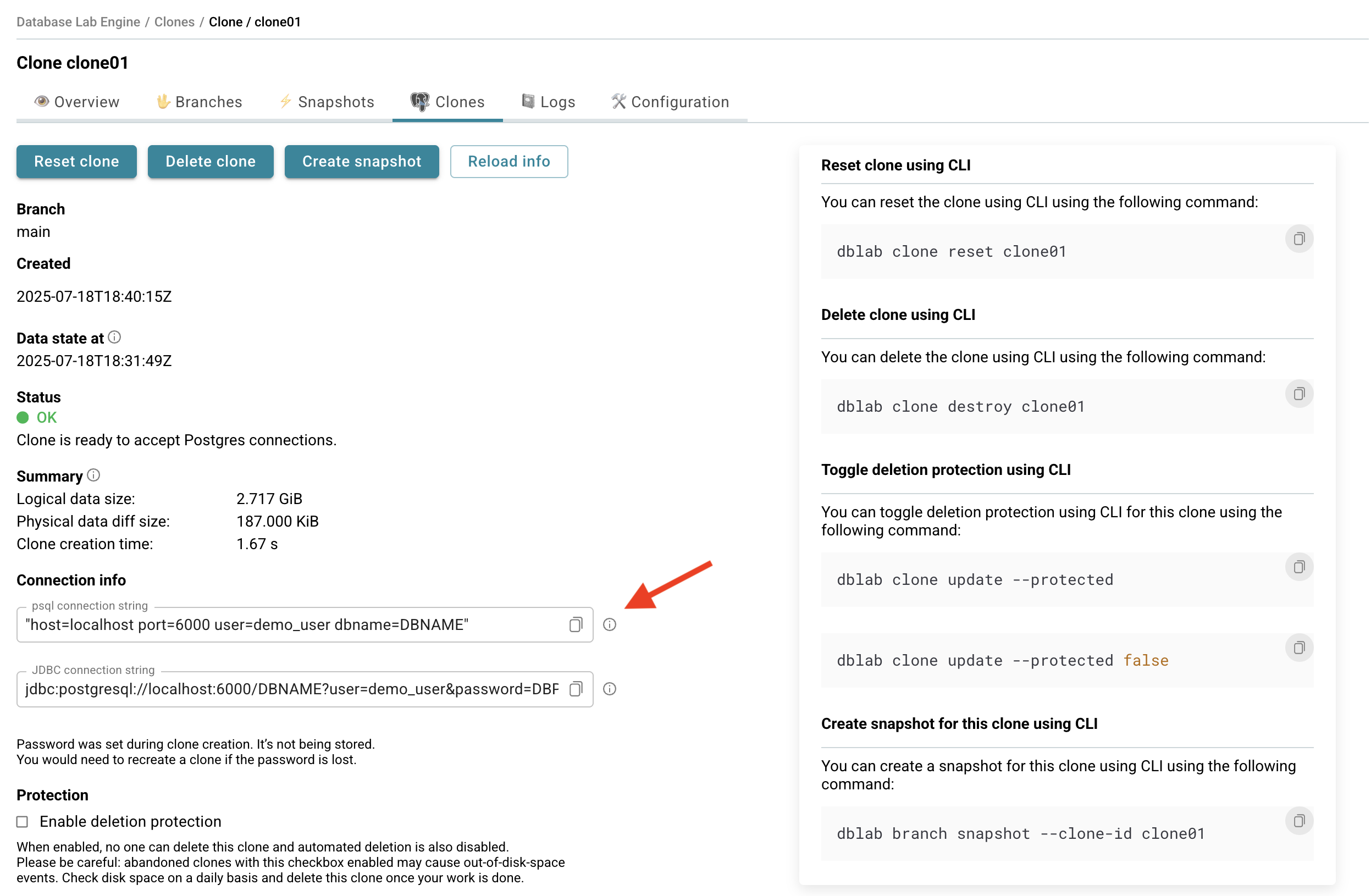
What you get
A clone in the DBLab UI, ready for connections 1.67 seconds after it was requested (a 2.7 GiB demo database). How it works
DBLab and Amazon RDS snapshot restore, side by side
| Question | DBLab | Amazon RDS snapshot restore |
|---|---|---|
| What it is | Open-source software that gives every developer, CI job and AI agent a writable, full-size copy of a PostgreSQL database in seconds. Thin clones share one physical copy of the data on one machine. docsdocs 2 | A built-in RDS operation that creates a new DB instance from a DB snapshot, or from automated backups at a chosen point in time. "You can't restore from a DB snapshot to an existing DB instance; you create a new DB instance when you restore the snapshot." 12 |
| Which databases it can copy | YesAny PostgreSQL from version 10 up, wherever it runs. Managed services such as Amazon RDS, Aurora, Cloud SQL and Supabase are copied with dump and restore; self-managed servers can also be copied physically with WAL-G, pgBackRest or pg_basebackup. docsdocs 2 | PartlyRestores snapshots and automated backups of RDS DB instances into a new RDS DB instance. A snapshot that is both shared and encrypted must be copied before it can be restored. 12 |
| How a copy is made | Copy-on-write in the file system, with ZFS or LVM. Clones share unchanged blocks, so a clone takes extra disk space only for what it changes. docs | RDS snapshots back up the whole DB instance as a storage volume snapshot. A restore creates a new instance with its own storage; after it becomes available, its volumes keep loading data blocks from Amazon S3 in the background. 12 |
| Time to get a copy | A few seconds whatever the database size: under 2 seconds for a 10 TiB database with one user, up to 30 seconds with 15 users at once. The first copy of the source is slow; about 1 TiB an hour is a good speed. docsdocs 2 | The instance can be used once its status is available. After a snapshot restore, data not yet loaded is fetched from S3 on first access; after a point-in-time restore, volumes load from S3 at up to 4 TiB per hour on gp3 or io2 Block Express, and performance "might not be at its fullest until initialization completes." The docs we read give no restore time. 12 |
| Data in a copy | YesThe whole database as of the chosen snapshot. Physical mode can follow the source continuously; logical mode is refreshed in full, on a schedule. docsdocs 2 | YesThe whole DB instance as of the snapshot, or as of any point within the backup retention period, which can be set from 0 to 35 days. 123 |
| Masking sensitive data | YesDocumented options: load an anonymized dump, or apply SQL transformations or PostgreSQL Anonymizer before snapshots are taken. You define the rules. docs | Not documentedNot documented in the sources we reviewed. 12 |
| CI and migration testing | YesDB Migration Checker runs pending migrations on a clone in CI, fails those that hold dangerous locks longer than a limit (10 seconds by default) and collects statistics. Any CI job can also create clones through the API or CLI. docs | PartlyThe sources we reviewed do not describe a CI integration. Restores can be scripted with the AWS CLI (restore-db-instance-from-db-snapshot, restore-db-instance-to-point-in-time), the RDS API, or CloudFormation (AWS::RDS::DBInstance). 12 |
| API, CLI and agent access | REST API, web UI and the dblab CLI. Joe, also available as pgai joe, returns EXPLAIN plans and timings from a clone, not rows. docsdocs 2docs 3 | AWS Management Console, AWS CLI, RDS API and CloudFormation. Initialization progress is shown in the StorageOperationStatus and StorageOperationPercentProgress fields of DescribeDBInstances. 12 |
| Where it runs | YesOn a machine you control, in any cloud or on-premises. DBLab SE installs from the PostgresAI Console or AWS Marketplace. docsdocs 2 | NoAmazon RDS is a managed AWS service. "Amazon RDS is responsible for hosting the software components and infrastructure of DB instances and DB clusters." 6 |
| Open source | YesDBLab Engine is open source under Apache 2.0. docs | Does not applySnapshot restore is a feature of Amazon RDS, a managed AWS service used through the AWS console, CLI or API. The database engine is PostgreSQL. 6 |
| Documented limits | DBLab SE: 2,000 GiB per instance and a single user. All clones share one machine, and copy-on-write storage has different I/O performance, so timings on a clone should not be compared directly with production. docsdocs 2 | Each restore is a new DB instance and counts toward the DB instance quota: 40 per Region by default for PostgreSQL (20 in ap-south-1), adjustable. Storage cannot be reduced on restore, and an increase must be at least 10 percent. The default parameter group is used unless you choose one. Manual snapshots: 100 per Region by default. 512 |
| What you pay for | One machine and one physical copy of the data, however many clones run. DBLab SE is billed hourly by the size of that machine, not by database size or number of clones. docs | Each restored instance is billed as an RDS DB instance: instance hours by class, billed in 1-second increments with a 10-minute minimum, plus its own provisioned storage per GiB-month, provisioned IOPS where used, and backup storage. 47 |
Pricing
| Product | Plan | List price | Notes |
|---|---|---|---|
| DBLab | DBLab Engine | Free | Open source, Apache 2.0; you run it |
| DBLab | DBLab SE | From $62/month | Billed hourly by machine size, plus your own cloud costs; 2,000 GiB limit; single user |
| DBLab | DBLab EE | Custom | Annual contract, from $0.2662 per 100 GiB per hour; unlimited database size, SSO |
| Amazon RDS snapshot restore | Restored DB instance | Per DB instance-hour, by instance class | Billed in 1-second increments with a 10-minute minimum; for example db.m7g.large, Single-AZ, $0.168 per hour in US East (N. Virginia) 74 |
| Amazon RDS snapshot restore | Storage of the restored instance | Per GiB-month of provisioned storage | Each restored instance has its own storage; for example gp3, Single-AZ, $0.115 per GB-month in US East (N. Virginia); gp3 and Provisioned IOPS storage also bill provisioned IOPS 4 |
| Amazon RDS snapshot restore | Backup storage | Per GiB-month | Automated backups and manual snapshots; no additional charge up to 100% of your total database storage in the Region 47 |
List prices on 18 Nov 2026. The billing units differ, so this is not a total-cost comparison. Rates vary by Region, instance class and storage type. There is no separate fee for the restore operation in the sources we read; you pay for the instance it creates. DBLab pricing
Using DBLab with Amazon RDS snapshot restore
DBLab names Amazon RDS as a source: it copies an RDS database with dump and restore and refreshes it in full. For RDS and Aurora, that refresh can dump from a temporary RDS clone, leaving production untouched (DBLab 4.1 and later). Snapshot restore remains the way to recover an RDS instance or get a standalone full copy.
Questions
- How long does it take to restore an RDS snapshot?
- AWS does not give a restore time in the pages we read. The new instance can be used once its status is available but keeps loading data from Amazon S3 in the background: lazily after a snapshot restore, and at up to 4 TiB per hour on gp3 or io2 Block Express after a point-in-time restore. Restoring to a different storage type is slower. 12
- Can I restore an RDS snapshot into an existing instance?
- No. AWS says you can't restore from a DB snapshot to an existing DB instance; a restore always creates a new DB instance. A point-in-time restore also creates a new instance without modifying the source. 12
- What does a restored RDS instance cost?
- It is billed like any RDS DB instance: instance hours by class, billed per second with a 10-minute minimum, plus its own provisioned storage, provisioned IOPS where used, and backup storage. Ten restored copies are ten instances. 47
- Can DBLab copy an Amazon RDS database?
- Yes. DBLab copies RDS with dump and restore in logical mode and refreshes it in full; the first copy is slow, about 1 TiB an hour. For RDS and Aurora, the refresh can dump from a temporary RDS clone, leaving production untouched (DBLab 4.1 and later). 1
Try a clone before you install anything
The public demo runs DBLab Engine: open it with the token demo-token, create a clone and connect to it. DBLab Engine is open source, so the next step is a machine of your own.
Sources
- RDS User Guide: Restoring to a DB instance
- RDS User Guide: Restoring a DB instance to a specified time
- RDS User Guide: Backup retention period
- RDS User Guide: DB instance billing
- RDS User Guide: Quotas and constraints
- RDS User Guide: What is Amazon RDS?
- Amazon RDS for PostgreSQL pricing
These pages compare what each product does for PostgreSQL; other databases and the rest of the stack are out of scope. What we say about the other product comes from its own documentation, pricing page, changelog or source repository, read on the date shown; each row cites its source. "Not documented" means we did not find it in those sources, not that the product cannot do it. Prices are list prices and the billing units differ, so they are not a total-cost comparison. Product names are trademarks of their owners. Found a mistake? Tell us and we will correct the page.
More comparisons
- Amazon Aurora cloningclones of any Postgres vs Aurora clusters
- Amazon RDS Blue/Green Deploymentstest clones vs a switchover
- Cloud SQL cloningthin clones vs a new Cloud SQL instance
- Ardentself-hosted thin clones vs a replicated branch service
- CREATE DATABASE ... TEMPLATEthin clones vs in-server copies
- Databricks Lakebaseclones of any Postgres vs Lakebase branches
- Delphixopen-source thin clones vs a test data platform
- Neonclones of any Postgres vs branches on Neon
- All comparisons