DBLab vs Supabase Branching
full-size copies vs preview branches
Supabase Branching creates preview and persistent environments for a Supabase project, without production data by default. DBLab makes full-size clones of any Postgres.
Where DBLab is ahead of Supabase Branching
Each point pairs what our documentation says with what the Supabase Branching documentation says. Follow the links and check.
All the data, not a sample
The data stays on a machine you control
Clones the Postgres you already run
One copy of the data, many clones
Short answer
Supabase Branching gives a Supabase project separate preview and persistent environments, usually one per Git branch or pull request. A branch gets its schema from your migrations, its Edge Functions and configuration from the base project, and no production data by default. DBLab Engine is open-source software that makes full-size thin clones of any PostgreSQL, including Supabase, on a machine you run. Use Supabase branches to preview schema and app changes on Supabase; use DBLab when a test needs the full production data. The two can be used together on the same Supabase project.
When Supabase Branching is the better choice
- Your app already runs on Supabase. A branch is a Supabase environment with the project's Edge Functions and configuration, not only a database.
- The GitHub integration creates a Supabase branch for each Git branch, runs your committed migrations, reports status in a pull request comment, and can deploy migrations to production on merge.
- No fixed fee per branch: a Micro branch costs $0.01344 per hour on Pro and Team, and preview branches auto-pause after inactivity.
- Persistent branches give long-lived staging, QA or development environments, with per-branch settings and secrets kept in config.toml.
- Branches start without production data by default, so personal data does not reach preview environments unless you choose Include data.
What you get
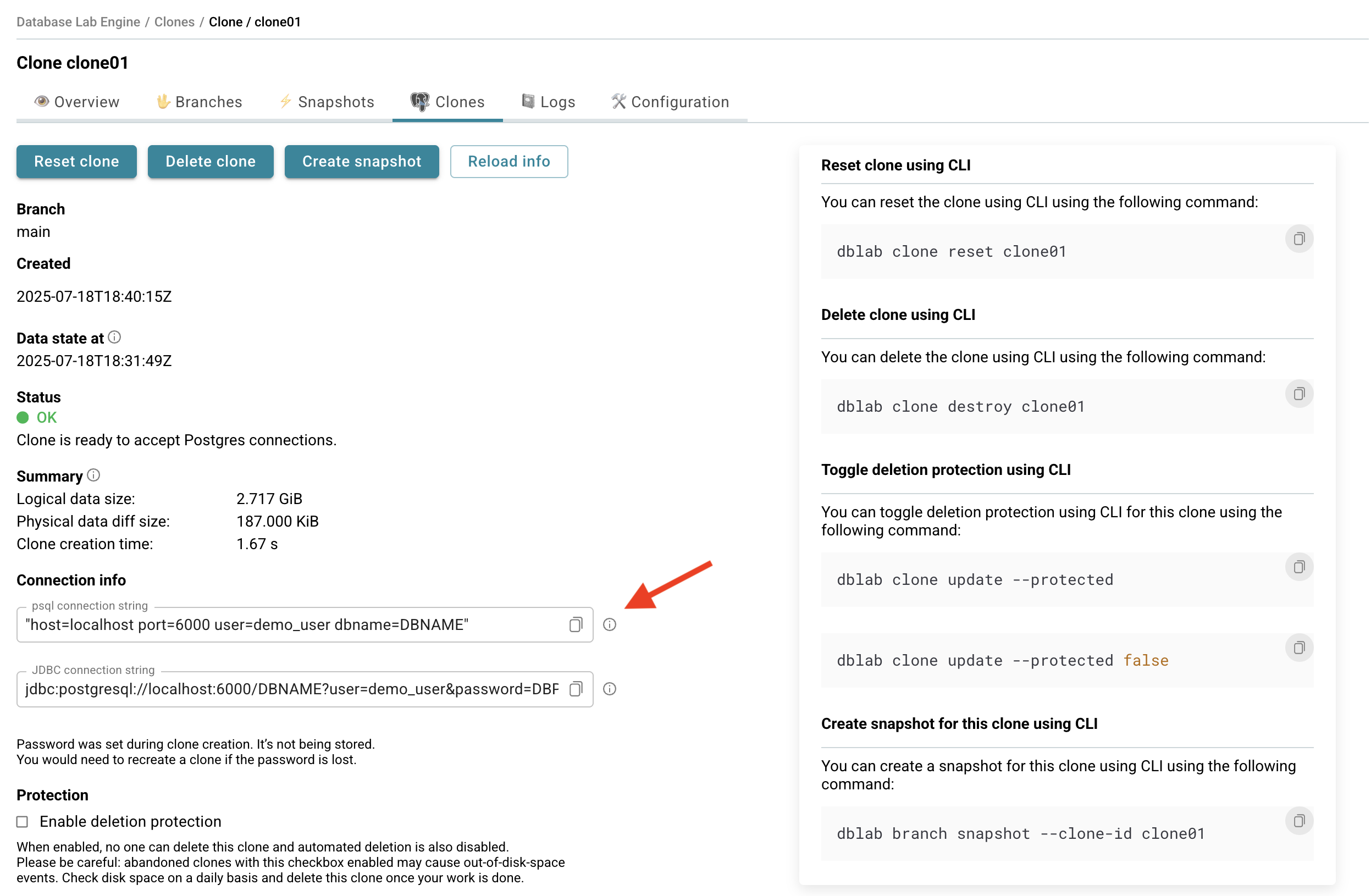
A clone in the DBLab UI, ready for connections 1.67 seconds after it was requested (a 2.7 GiB demo database). How it works
DBLab and Supabase Branching, side by side
| Question | DBLab | Supabase Branching |
|---|---|---|
| What it is | Open-source software that gives every developer, CI job and AI agent a writable, full-size copy of a PostgreSQL database in seconds. Thin clones share one physical copy of the data on one machine. docsdocs 2 | A feature of the hosted Supabase platform. "Supabase branches create separate environments that spin off from your base project." Preview branches are ephemeral, for testing; persistent branches are long-lived, for staging, QA or development. 112 |
| Which databases it can copy | YesAny PostgreSQL from version 10 up, wherever it runs. Managed services such as Amazon RDS, Aurora, Cloud SQL and Supabase are copied with dump and restore; self-managed servers can also be copied physically with WAL-G, pgBackRest or pg_basebackup. docsdocs 2 | PartlyBranches spin off a Supabase project. A database on another provider gets there by migration; Supabase has migration guides for Amazon RDS, Postgres, Neon, Heroku, Render and Vercel Postgres. 111 |
| How a copy is made | Copy-on-write in the file system, with ZFS or LVM. Clones share unchanged blocks, so a clone takes extra disk space only for what it changes. docs | Each branch is a separate environment. It clones the base project's Edge Functions and configuration and builds its database schema from migrations: those committed to the repository for a GitHub-connected branch, or the base project's migration history for a Dashboard branch. Seed files can then add rows. 31 |
| Time to get a copy | A few seconds whatever the database size: under 2 seconds for a 10 TiB database with one user, up to 30 seconds with 15 users at once. The first copy of the source is slow; about 1 TiB an hour is a good speed. docsdocs 2 | The docs we read give no time in seconds. Creation runs migrations and seed files, and the troubleshooting guide says large migrations, large seed files and network latency can slow it. 53 |
| Data in a copy | YesThe whole database as of the chosen snapshot. Physical mode can follow the source continuously; logical mode is refreshed in full, on a schedule. docsdocs 2 | Partly"By default, new branches do not start with any data or storage objects from your base project." Data comes from a seed file, or from the Include data option in the Dashboard, which needs the Point-in-Time Recovery add-on and gives the branch a larger disk and the project's compute size. 12 |
| Masking sensitive data | YesDocumented options: load an anonymized dump, or apply SQL transformations or PostgreSQL Anonymizer before snapshots are taken. You define the rules. docs | Not documentedNot documented in the sources we reviewed. The default of starting branches without data, with seed files for sample data, keeps production rows out of preview branches. 13 |
| CI and migration testing | YesDB Migration Checker runs pending migrations on a clone in CI, fails those that hold dangerous locks longer than a limit (10 seconds by default) and collects statistics. Any CI job can also create clones through the API or CLI. docs | YesThe GitHub integration creates a branch per Git branch, runs new migrations on each commit, posts the deployment status on the pull request, and can deploy migrations, functions and buckets to production on merge. Each migration runs in one transaction, so create index concurrently fails there. 3 |
| API, CLI and agent access | REST API, web UI and the dblab CLI. Joe, also available as pgai joe, returns EXPLAIN plans and timings from a clone, not rows. docsdocs 2docs 3 | GitHub integration, the Dashboard (branch management there is labeled alpha and beta on the same page), the supabase branches CLI commands (create, list, get, update, pause, unpause, delete), and experimental MCP tools that create, merge, reset, rebase and delete branches on paid plans. 3278 |
| Where it runs | YesOn a machine you control, in any cloud or on-premises. DBLab SE installs from the PostgresAI Console or AWS Marketplace. docsdocs 2 | NoHosted only. The self-hosting guide says "Some features of the managed platform aren't available when self-hosting: branching". 10 |
| Open source | YesDBLab Engine is open source under Apache 2.0. docs | PartlySupabase is on GitHub under Apache 2.0 and can be self-hosted, but branching is one of the features the docs list as not available when self-hosting. 910 |
| Documented limits | DBLab SE: 2,000 GiB per instance and a single user. All clones share one machine, and copy-on-write storage has different I/O performance, so timings on a clone should not be compared directly with production. docsdocs 2 | Not on the Free plan. Branches merge only to main, not between preview branches. Custom roles created in the Dashboard are not copied. Preview branches auto-pause after inactivity and resume on the first request. The sources we reviewed do not state a branch count limit. 625 |
| What you pay for | One machine and one physical copy of the data, however many clones run. DBLab SE is billed hourly by the size of that machine, not by database size or number of clones. docs | Usage-based, with no fixed fee per preview branch. A branch on the default Micro compute starts at $0.01344 per hour, plus egress and disk. Branch usage counts toward the plan quota, is not covered by the Spend Cap, and compute credits do not apply. 46 |
Pricing
| Product | Plan | List price | Notes |
|---|---|---|---|
| DBLab | DBLab Engine | Free | Open source, Apache 2.0; you run it |
| DBLab | DBLab SE | From $62/month | Billed hourly by machine size, plus your own cloud costs; 2,000 GiB limit; single user |
| DBLab | DBLab EE | Custom | Annual contract, from $0.2662 per 100 GiB per hour; unlimited database size, SSO |
| Supabase Branching | Free | $0/month | Branching not included 6 |
| Supabase Branching | Pro | From $25/month | Branching at $0.01344 per branch per hour; $10/month compute credits, which do not apply to branch compute 64 |
| Supabase Branching | Team | From $599/month | Branching at $0.01344 per branch per hour 6 |
| Supabase Branching | Enterprise | Custom | Branching price custom 6 |
List prices on 18 Nov 2026. The billing units differ, so this is not a total-cost comparison. $0.01344 per hour is the Micro compute size. A branch created with Include data matches the project's compute size and uses a larger disk, which costs more. DBLab pricing
Using DBLab with Supabase Branching
DBLab copies a Supabase database by dump and restore, so both can serve the same Supabase project. Supabase branches carry migrations, Edge Functions and configuration through pull requests and preview deployments on Supabase. A DBLab clone of the same database gives a full-size copy of production data on a machine you control, to check query plans and migration timing before the change merges.
Questions
- Do Supabase branches include production data?
- Not by default. The docs say new branches do not start with any data or storage objects from the base project. You can load sample data with a seed file, or create a branch in the Dashboard with Include data, which needs the Point-in-Time Recovery add-on. 12
- What does Supabase Branching cost?
- Branching is on Pro, Team and Enterprise, not Free. There is no fixed fee per preview branch; a branch on Micro compute starts at $0.01344 per hour, plus egress and disk. Branch usage is not covered by the Spend Cap, and compute credits do not apply to it. 64
- Does Supabase Branching work with self-hosted Supabase?
- No. The self-hosting guide lists branching among the features of the managed platform that are not available when self-hosting. 10
- Can I use DBLab and Supabase Branching together?
- Yes. Supabase branches run migrations and app previews on Supabase, starting without production data. DBLab copies a Supabase database by dump and restore and gives full-size thin clones on a machine you control, for tests that need real data volumes. 13
Try a clone before you install anything
The public demo runs DBLab Engine: open it with the token demo-token, create a clone and connect to it. DBLab Engine is open source, so the next step is a machine of your own.
Sources
- Supabase docs: Branching
- Supabase docs: Branching via the Dashboard
- Supabase docs: Branching GitHub integration
- Supabase docs: Manage branching usage
- Supabase docs: Branching troubleshooting
- Supabase pricing
- Supabase CLI reference: supabase branches
- Supabase docs: Model Context Protocol
- supabase/supabase repository
- Supabase docs: Self-hosting
- Supabase knowledge base: Migration
- Supabase docs: Branching configuration
These pages compare what each product does for PostgreSQL; other databases and the rest of the stack are out of scope. What we say about the other product comes from its own documentation, pricing page, changelog or source repository, read on the date shown; each row cites its source. "Not documented" means we did not find it in those sources, not that the product cannot do it. Prices are list prices and the billing units differ, so they are not a total-cost comparison. Product names are trademarks of their owners. Found a mistake? Tell us and we will correct the page.
More comparisons
- Databricks Lakebaseclones of any Postgres vs Lakebase branches
- Neonclones of any Postgres vs branches on Neon
- PlanetScaleclones in seconds vs branches restored from backup
- Tiger Dataclones of any Postgres vs Tiger Cloud forks
- Velaclones of any Postgres vs branches on Vela
- Xatathin clones on one machine vs a branching platform
- Amazon Aurora cloningclones of any Postgres vs Aurora clusters
- Amazon RDS Blue/Green Deploymentstest clones vs a switchover
- All comparisons