DBLab vs Tiger Data
clones of any Postgres vs Tiger Cloud forks
Tiger Data forks a Tiger Cloud service, now or from a past point, with copy-on-write on free services. DBLab clones any PostgreSQL on a machine you control.
Where DBLab is ahead of Tiger Data
Each point pairs what our documentation says with what the Tiger Data documentation says. Follow the links and check.
The whole database, in seconds
Clones the Postgres you already run
One copy of the data, many clones
The data stays on a machine you control
Short answer
Tiger Data, formerly Timescale, runs Tiger Cloud, a hosted PostgreSQL service with TimescaleDB. A fork is an independent copy of a Tiger Cloud service, from now, the last daily backup or a past timestamp. Free services fork in about 30 to 90 seconds on copy-on-write storage; standard services restore from backup and WAL, typically in 5 to 20+ minutes. DBLab Engine is open-source software that makes full-size thin clones of any PostgreSQL, wherever it runs, on a machine you control. If production runs on Tiger Cloud, its forks are the direct path. If production stays elsewhere, DBLab clones it in place.
When Tiger Data is the better choice
- Your database already runs on Tiger Cloud. A fork is made from the service itself in the Console, with the tiger CLI or through MCP, with no second copy to load and no clone server to run.
- Forks from a past state: from the last daily backup or any timestamp within the recovery period, 3 days on Performance and 14 days on Scale.
- Free services use copy-on-write storage: a fork takes about 30 to 90 seconds, and only chunks that diverge from the parent are billed.
- A ready-made GitHub Action, timescale/fork-service, forks a service when a pull request opens, runs the tests against the fork and cleans up.
- Tiger MCP is built into the open-source Tiger CLI, with a service_fork tool and a read-only mode that turns off mutating tools.
What you get
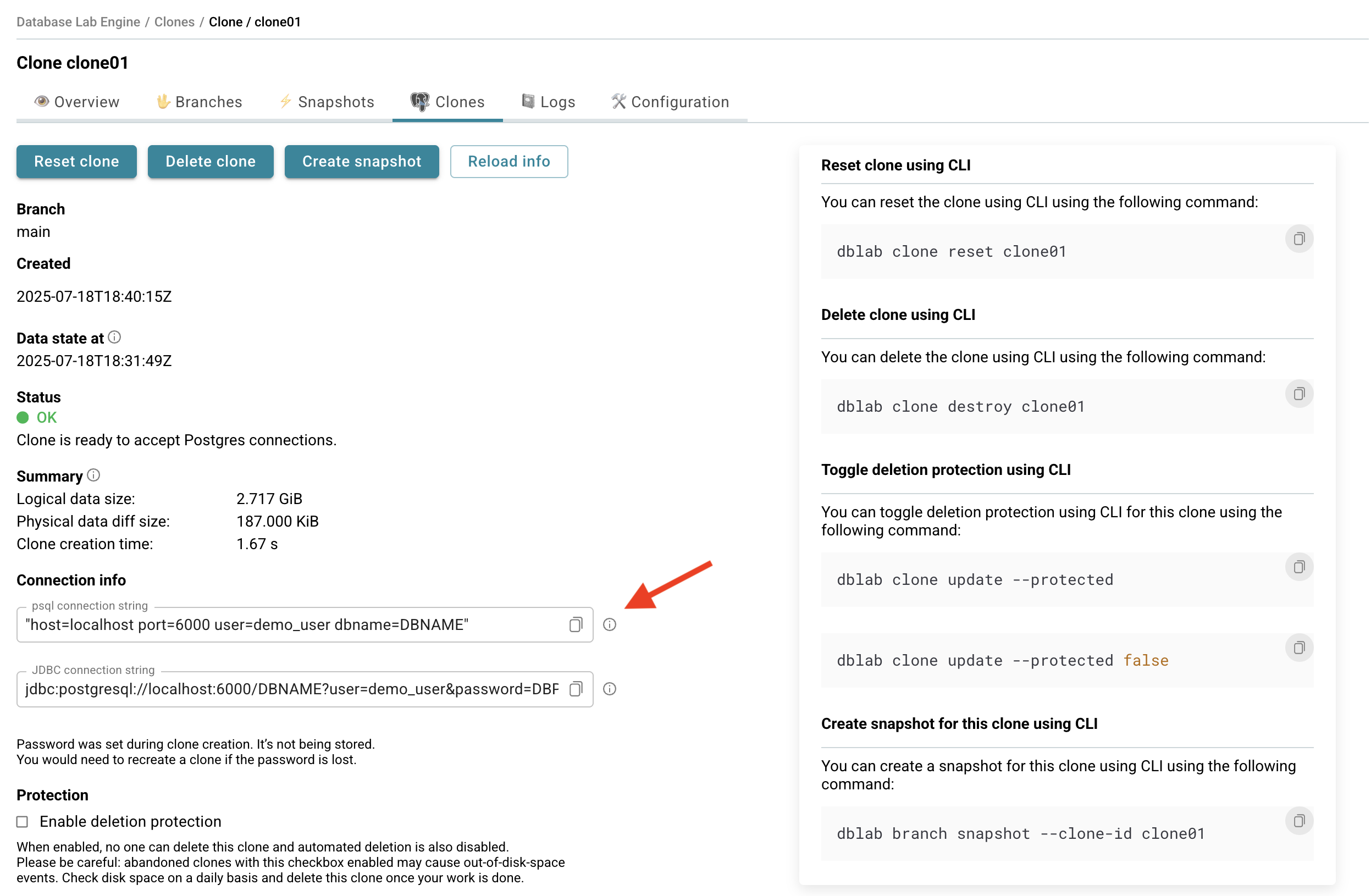
A clone in the DBLab UI, ready for connections 1.67 seconds after it was requested (a 2.7 GiB demo database). How it works
DBLab and Tiger Data, side by side
| Question | DBLab | Tiger Data |
|---|---|---|
| What it is | Open-source software that gives every developer, CI job and AI agent a writable, full-size copy of a PostgreSQL database in seconds. Thin clones share one physical copy of the data on one machine. docsdocs 2 | Tiger Cloud is a hosted PostgreSQL platform with the TimescaleDB extension. A fork is an exact copy of a Tiger Cloud service at a point in time, with its own data, configuration and compute, used for testing, analysis and recovery. 18 |
| Which databases it can copy | YesAny PostgreSQL from version 10 up, wherever it runs. Managed services such as Amazon RDS, Aurora, Cloud SQL and Supabase are copied with dump and restore; self-managed servers can also be copied physically with WAL-G, pgBackRest or pg_basebackup. docsdocs 2 | PartlyForks are made from Tiger Cloud services. Other PostgreSQL databases, including Amazon RDS and Aurora, get there by migration: Livesync replication keeps the target in sync until cutover, or pg_dump for databases under 100 GB where downtime is acceptable. 17 |
| How a copy is made | Copy-on-write in the file system, with ZFS or LVM. Clones share unchanged blocks, so a clone takes extra disk space only for what it changes. docs | Free services use copy-on-write storage (Fluid Storage) with zero-copy between a fork and the parent. Standard services use traditional storage with backup restore plus WAL. By default a fork gets compute that matches the parent's resources. 14 |
| Time to get a copy | A few seconds whatever the database size: under 2 seconds for a 10 TiB database with one user, up to 30 seconds with 15 users at once. The first copy of the source is slow; about 1 TiB an hour is a good speed. docsdocs 2 | Free services: about 30 to 90 seconds. Standard services: varies with the size of the service, typically 5 to 20+ minutes. 1 |
| Data in a copy | YesThe whole database as of the chosen snapshot. Physical mode can follow the source continuously; logical mode is refreshed in full, on a schedule. docsdocs 2 | YesA fork contains the database data and schema, the configuration and an admin user with a new password. Strategies: now, the last snapshot (backups are daily), or a timestamp within the plan's recovery period. 1 |
| Masking sensitive data | YesDocumented options: load an anonymized dump, or apply SQL transformations or PostgreSQL Anonymizer before snapshots are taken. You define the rules. docs | Not documentedNot documented in the sources we reviewed. 1 |
| CI and migration testing | YesDB Migration Checker runs pending migrations on a clone in CI, fails those that hold dangerous locks longer than a limit (10 seconds by default) and collects statistics. Any CI job can also create clones through the API or CLI. docs | YesThe GitHub Action timescale/fork-service forks a service when a pull request is opened, from now or the last snapshot, runs tests and migrations against the fork, then cleans it up. It authenticates with a Tiger Cloud API key. 1 |
| API, CLI and agent access | REST API, web UI and the dblab CLI. Joe, also available as pgai joe, returns EXPLAIN plans and timings from a clone, not rows. docsdocs 2docs 3 | Tiger Console, the tiger CLI (tiger service fork) and Tiger MCP, built into the CLI, with a service_fork tool. Read-only mode turns off mutating tools, fork included. The CLI installs the MCP server for Claude Code, Codex, Cursor, Gemini CLI, VS Code and others. 156 |
| Where it runs | YesOn a machine you control, in any cloud or on-premises. DBLab SE installs from the PostgresAI Console or AWS Marketplace. docsdocs 2 | PreviewTiger Cloud forks run in Tiger Data's hosted service, on AWS or Azure. TimescaleDB Enterprise, in public beta, runs on your own Linux servers, and its console can fork a service there. 1211 |
| Open source | YesDBLab Engine is open source under Apache 2.0. docs | PartlyTimescaleDB is on GitHub; its LICENSE file puts code outside the tsl directory under Apache 2.0 and code inside it under the Timescale License. The Tiger CLI is under Apache 2.0. Forks are part of the hosted Tiger Cloud service. 86 |
| Documented limits | DBLab SE: 2,000 GiB per instance and a single user. All clones share one machine, and copy-on-write storage has different I/O performance, so timings on a clone should not be compared directly with production. docsdocs 2 | Point-in-time recovery and forking: 3 days on Performance, 14 days on Scale; the docs list up to 180 days on Enterprise. A service cannot be forked while it is provisioning or changing state. Free services, the copy-on-write ones, are in beta; two are included on all plans. 231 |
| What you pay for | One machine and one physical copy of the data, however many clones run. DBLab SE is billed hourly by the size of that machine, not by database size or number of clones. docs | A fork is a service of its own: compute metered hourly, storage by average GB per hour. On copy-on-write storage only chunks that diverge from the parent are billed; on traditional storage the whole fork is. Tiered chunks are billed once, however many forks exist. 12 |
Pricing
| Product | Plan | List price | Notes |
|---|---|---|---|
| DBLab | DBLab Engine | Free | Open source, Apache 2.0; you run it |
| DBLab | DBLab SE | From $62/month | Billed hourly by machine size, plus your own cloud costs; 2,000 GiB limit; single user |
| DBLab | DBLab EE | Custom | Annual contract, from $0.2662 per 100 GiB per hour; unlimited database size, SSO |
| Tiger Data | Performance | Compute from $30/month | Hourly billing; storage $0.177/GB-month, an effective price that assumes 5x compression; up to 4 services; point-in-time recovery 3 days; 30-day free trial 23 |
| Tiger Data | Scale | Compute from $36/month | Hourly billing; storage $0.212/GB-month, an effective price that assumes 5x compression; unlimited services; point-in-time recovery 14 days 23 |
| Tiger Data | Enterprise | Custom | Contact sales 2 |
| Tiger Data | Free services | Free | Two free services included on all plans, in beta; copy-on-write forks in about 30 to 90 seconds 31 |
List prices on 18 Nov 2026. The billing units differ, so this is not a total-cost comparison. Tiger Cloud charges by consumption: compute is metered hourly and storage by average GB per hour. DBLab pricing
Questions
- Can Tiger Data fork a database that runs on Amazon RDS?
- Not in place. Tiger Cloud forks are made from Tiger Cloud services, so the data has to be migrated first, for example with Livesync replication, which works with RDS and Aurora when logical replication is enabled. DBLab clones such databases where they are, by dump and restore. 17
- How long does a Tiger Cloud fork take?
- About 30 to 90 seconds for free services, which use copy-on-write storage. Standard services restore from backup plus WAL and typically take 5 to 20+ minutes, depending on size. 1
- Is Tiger Data the same company as Timescale?
- Yes. Timescale changed its name to Tiger Data on June 17, 2025. The cloud service is called Tiger Cloud, and the open-source extension remains TimescaleDB. 9
- What is Ghost from Tiger Data?
- Ghost is hosted Postgres you spin up, fork and throw away, made by Tiger Data. Its site says Ghost is winding down: it no longer accepts new users and will be shut down eventually, with a timeline and export instructions to follow. 10
Try a clone before you install anything
The public demo runs DBLab Engine: open it with the token demo-token, create a clone and connect to it. DBLab Engine is open source, so the next step is a machine of your own.
Sources
- Tiger Data docs: Fork services
- Tiger Data pricing
- Tiger Data docs: Pricing and account management
- Tiger Data blog: Fluid Storage
- Tiger Data docs: Tiger MCP reference
- timescale/tiger-cli repository
- Tiger Data docs: Choose a migration approach
- timescale/timescaledb repository
- Tiger Data blog: Timescale becomes Tiger Data
- Ghost by Tiger Data
- Tiger Data docs: Meet TimescaleDB Enterprise
These pages compare what each product does for PostgreSQL; other databases and the rest of the stack are out of scope. What we say about the other product comes from its own documentation, pricing page, changelog or source repository, read on the date shown; each row cites its source. "Not documented" means we did not find it in those sources, not that the product cannot do it. Prices are list prices and the billing units differ, so they are not a total-cost comparison. Product names are trademarks of their owners. Found a mistake? Tell us and we will correct the page.
More comparisons
- Databricks Lakebaseclones of any Postgres vs Lakebase branches
- Neonclones of any Postgres vs branches on Neon
- PlanetScaleclones in seconds vs branches restored from backup
- Supabase Branchingfull-size copies vs preview branches
- Velaclones of any Postgres vs branches on Vela
- Xatathin clones on one machine vs a branching platform
- Amazon Aurora cloningclones of any Postgres vs Aurora clusters
- Amazon RDS Blue/Green Deploymentstest clones vs a switchover
- All comparisons