DBLab vs ZFS snapshots and clones
same copy-on-write, by hand or managed
ZFS snapshots and clones give free, writable copy-on-write copies of a PostgreSQL data directory by hand. DBLab uses ZFS or LVM underneath and manages the clones.
Where DBLab is ahead of ZFS snapshots and clones
Each point pairs what our documentation says with what the ZFS snapshots and clones documentation says. Follow the links and check.
Clones the Postgres you already run
Masking by rules you define
DBLabLoad an anonymized dump, or apply SQL transformations or PostgreSQL Anonymizer before snapshots are taken. docs
Catches a dangerous migration in CI
DBLabDB Migration Checker runs pending migrations on a clone in CI and fails those that hold dangerous locks longer than a limit, 10 seconds by default. docs
Short answer
OpenZFS snapshots a dataset atomically and turns a snapshot into a writable clone almost instantly, using no extra space at first. With a PostgreSQL data directory and its WAL on ZFS, you snapshot, clone and start a server on the clone; PostgreSQL replays WAL as after a crash. DBLab Engine does the same underneath, with ZFS or LVM, and adds loading data from any source including managed services, refresh, clone lifecycle, an API, CLI and web UI, and CI migration checks. Doing it by hand is free and gives full control over every command; the scripts around it are then yours to write and run.
When ZFS snapshots and clones is the better choice
- Free and open source under the CDDL, on Linux and FreeBSD, with no extra service to run.
- The same mechanism DBLab relies on: snapshots are created atomically, and a clone is nearly instantaneous and initially consumes no additional space.
- Full control: you choose the datasets, recordsize, compression and when to snapshot, and zfs promote can make a tested clone the main file system.
- A self-managed server already on ZFS needs no data loading step: the PostgreSQL docs describe snapshotting the data directory while the server runs, with WAL included.
- zfs snapshot -r creates snapshots of descendent datasets at the same time, so separate data and WAL datasets, as OpenZFS suggests for PostgreSQL, can be snapshotted together.
What you get
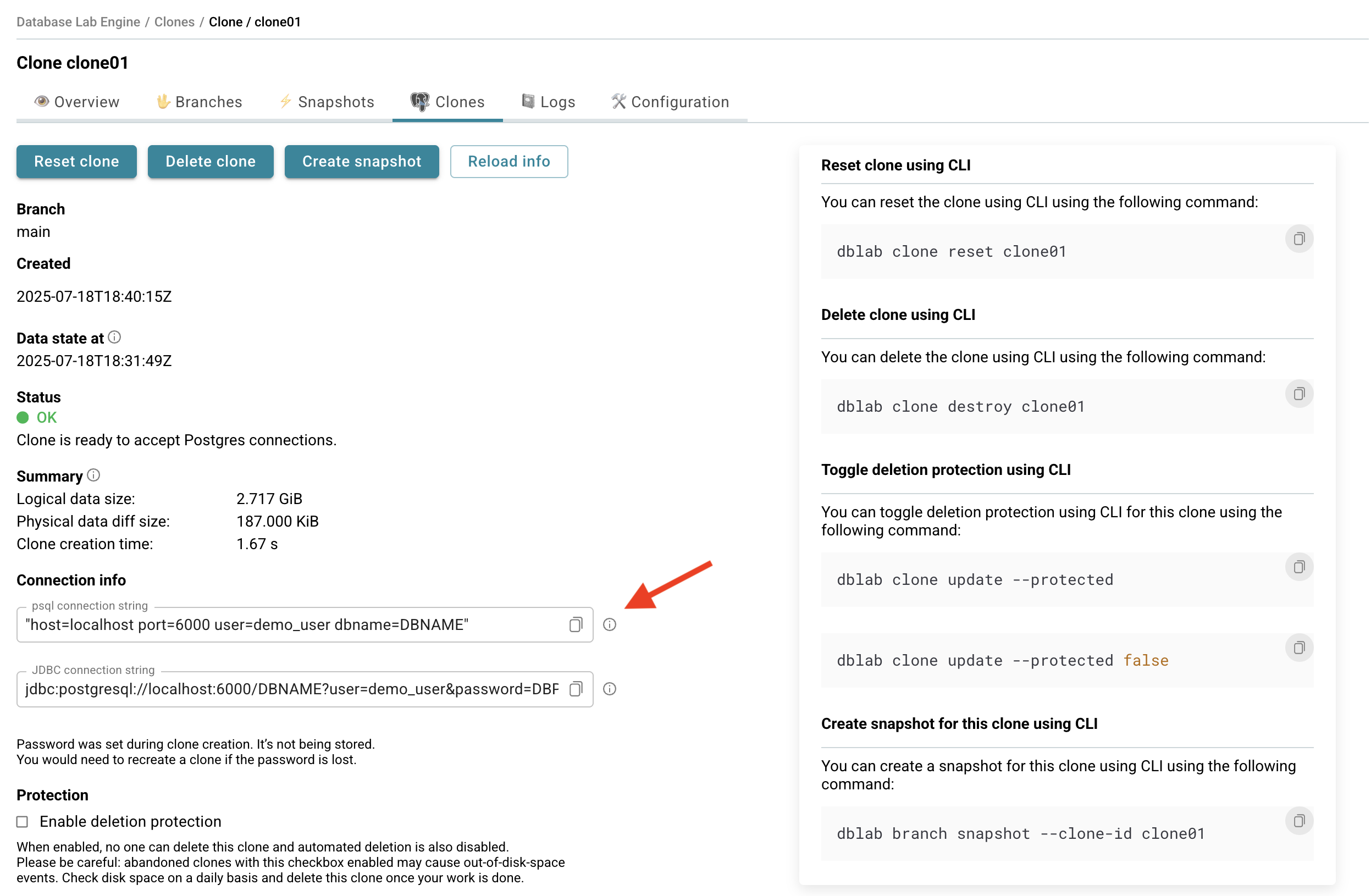
A clone in the DBLab UI, ready for connections 1.67 seconds after it was requested (a 2.7 GiB demo database). How it works
DBLab and ZFS snapshots and clones, side by side
| Question | DBLab | ZFS snapshots and clones |
|---|---|---|
| What it is | Open-source software that gives every developer, CI job and AI agent a writable, full-size copy of a PostgreSQL database in seconds. Thin clones share one physical copy of the data on one machine. docsdocs 2 | A copy-on-write file system; a storage pool holds file systems and volumes. A snapshot is a read-only copy of a dataset; a clone is a writable file system whose initial contents are the same as a snapshot. A clone of a dataset holding a PostgreSQL data directory is a writable copy of the whole cluster. 1375 |
| Which databases it can copy | YesAny PostgreSQL from version 10 up, wherever it runs. Managed services such as Amazon RDS, Aurora, Cloud SQL and Supabase are copied with dump and restore; self-managed servers can also be copied physically with WAL-G, pgBackRest or pg_basebackup. docsdocs 2 | PartlyWhatever sits on a ZFS dataset you control. The PostgreSQL docs describe snapshotting the data directory of a server, so this needs access to its files: a self-managed server on ZFS, or a physical copy placed on ZFS. 71 |
| How a copy is made | Copy-on-write in the file system, with ZFS or LVM. Clones share unchanged blocks, so a clone takes extra disk space only for what it changes. docs | Copy-on-write in the file system. A snapshot is a consistent image including all completed writes; a clone shares blocks with its snapshot. Starting PostgreSQL on a clone replays WAL as after a crash, so the WAL files must be in the snapshot. 127 |
| Time to get a copy | A few seconds whatever the database size: under 2 seconds for a 10 TiB database with one user, up to 30 seconds with 15 users at once. The first copy of the source is slow; about 1 TiB an hour is a good speed. docsdocs 2 | Snapshots "can be created extremely quickly" and creating a clone "is nearly instantaneous." PostgreSQL then has to start and replay WAL; a CHECKPOINT before the snapshot reduces that recovery time. 17 |
| Data in a copy | YesThe whole database as of the chosen snapshot. Physical mode can follow the source continuously; logical mode is refreshed in full, on a schedule. docsdocs 2 | YesThe whole PostgreSQL cluster as of the snapshot, every database included. Single tables or databases cannot be copied at file level, because table files are not usable without the commit log (pg_xact). 73 |
| Masking sensitive data | YesDocumented options: load an anonymized dump, or apply SQL transformations or PostgreSQL Anonymizer before snapshots are taken. You define the rules. docs | Not documentedNot documented in the sources we reviewed. A clone's initial contents are the same as its snapshot. 13 |
| CI and migration testing | YesDB Migration Checker runs pending migrations on a clone in CI, fails those that hold dangerous locks longer than a limit (10 seconds by default) and collects statistics. Any CI job can also create clones through the API or CLI. docs | PartlyNo CI feature is documented. The zfs commands can be scripted in a CI job; starting PostgreSQL on each clone and destroying clones afterwards is left to your scripts. 23 |
| API, CLI and agent access | REST API, web UI and the dblab CLI. Joe, also available as pgai joe, returns EXPLAIN plans and timings from a clone, not rows. docsdocs 2docs 3 | The zfs command line: zfs snapshot, zfs clone, zfs promote and zfs destroy. The PostgreSQL server on each clone is started and managed with the usual PostgreSQL tools. 234 |
| Where it runs | YesOn a machine you control, in any cloud or on-premises. DBLab SE installs from the PostgresAI Console or AWS Marketplace. docsdocs 2 | YesOn your own machine with an OpenZFS pool. The Getting Started guide covers Alpine, Arch, Debian, Fedora, FreeBSD, Gentoo, NixOS, openSUSE, RHEL-based distros, Slackware and Ubuntu. 8 |
| Open source | YesDBLab Engine is open source under Apache 2.0. docs | YesOpenZFS is licensed under the CDDL. Because of the license combination it is not distributed as part of the Linux kernel binary, but as a binary module or as source code. 6 |
| Documented limits | DBLab SE: 2,000 GiB per instance and a single user. All clones share one machine, and copy-on-write storage has different I/O performance, so timings on a clone should not be compared directly with production. docsdocs 2 | All files must be in one simultaneous snapshot: if WAL or tablespaces are on other file systems, the PostgreSQL docs say snapshot backup may not be possible. A snapshot cannot be destroyed while a clone of it exists; zfs promote reverses that dependency. 714 |
| What you pay for | One machine and one physical copy of the data, however many clones run. DBLab SE is billed hourly by the size of that machine, not by database size or number of clones. docs | Free software. Snapshots and clones initially consume no additional space; space grows as the clone or its origin changes. You run the machine, the pool and the scripts. 16 |
Pricing
| Product | Plan | List price | Notes |
|---|---|---|---|
| DBLab | DBLab Engine | Free | Open source, Apache 2.0; you run it |
| DBLab | DBLab SE | From $62/month | Billed hourly by machine size, plus your own cloud costs; 2,000 GiB limit; single user |
| DBLab | DBLab EE | Custom | Annual contract, from $0.2662 per 100 GiB per hour; unlimited database size, SSO |
| ZFS snapshots and clones | Open source | Free | OpenZFS, CDDL license 6 |
List prices on 18 Nov 2026. The billing units differ, so this is not a total-cost comparison. DBLab pricing
Using DBLab with ZFS snapshots and clones
DBLab uses copy-on-write in the file system, with ZFS or LVM. A DBLab machine with a ZFS pool runs the same snapshots and clones, with data loading, refresh, clone management, an API, CLI and web UI, and CI migration checks added on top.
Questions
- Can I make PostgreSQL test copies with ZFS clones myself?
- Yes. Put the data directory and WAL on ZFS, take a snapshot, clone it and start PostgreSQL on the clone. The PostgreSQL docs say such a copy starts as if the server had crashed and replays WAL, and that a CHECKPOINT before the snapshot reduces recovery time. OpenZFS suggests separate datasets for data and WAL, with compression=lz4 and recordsize=32K. 7235
- Is a ZFS snapshot of a running PostgreSQL server consistent?
- Yes, if the data directory, WAL and all tablespaces are captured at the same moment. ZFS snapshots are atomic, and zfs snapshot -r creates snapshots of descendent datasets at the same time. If they cannot be captured together, the PostgreSQL docs suggest shutting the server down briefly or taking a continuous archiving base backup. 27
- Does DBLab use ZFS?
- Yes. DBLab makes clones with copy-on-write in the file system, using ZFS or LVM, so clones share unchanged blocks. It adds loading data from any PostgreSQL source, clone management through an API, CLI and web UI, and CI migration checks. 1
- Is OpenZFS free?
- Yes. The OpenZFS software is licensed under the CDDL, and its documentation under CC BY-SA 3.0. It is distributed as a binary module or source code rather than inside the Linux kernel binary. 6
Try a clone before you install anything
The public demo runs DBLab Engine: open it with the token demo-token, create a clone and connect to it. DBLab Engine is open source, so the next step is a machine of your own.
Sources
- OpenZFS docs: zfsconcepts(7)
- OpenZFS docs: zfs-snapshot(8)
- OpenZFS docs: zfs-clone(8)
- OpenZFS docs: zfs-promote(8)
- OpenZFS docs: Workload tuning, PostgreSQL
- OpenZFS docs: License
- PostgreSQL docs: File System Level Backup
- OpenZFS docs: Getting Started
These pages compare what each product does for PostgreSQL; other databases and the rest of the stack are out of scope. What we say about the other product comes from its own documentation, pricing page, changelog or source repository, read on the date shown; each row cites its source. "Not documented" means we did not find it in those sources, not that the product cannot do it. Prices are list prices and the billing units differ, so they are not a total-cost comparison. Product names are trademarks of their owners. Found a mistake? Tell us and we will correct the page.
More comparisons
- CREATE DATABASE ... TEMPLATEthin clones vs in-server copies
- pg_dump and pg_restorethin clones vs a full copy each time
- Amazon Aurora cloningclones of any Postgres vs Aurora clusters
- Amazon RDS Blue/Green Deploymentstest clones vs a switchover
- Amazon RDS snapshot restorethin clones vs a new instance each
- Ardentself-hosted thin clones vs a replicated branch service
- Cloud SQL cloningthin clones vs a new Cloud SQL instance
- Databricks Lakebaseclones of any Postgres vs Lakebase branches
- All comparisons