DBLab vs Snaplet
full-size clones vs seed and subset (closed 2024)
Snaplet shut down in 2024 and open-sourced Seed, Snapshot and Copycat under MIT. DBLab makes full-size thin clones of PostgreSQL with masking rules you define.
See how DBLab worksOpen the demoPricing
Status of Snaplet: Snaplet shut down as a company in 2024. On August 14, 2024 Supabase announced that Snaplet's Copycat, Seed and Snapshot were released under the MIT license. The repositories now live in the supabase-community GitHub organization; Snapshot was archived on May 11, 2026. 124
What DBLab offers in its place
Each point pairs what our documentation says with what the Snaplet documentation says. Follow the links and check.
All the data, not a sample
Clones the Postgres you already run
Catches a dangerous migration in CI
DBLabDB Migration Checker runs pending migrations on a clone in CI and fails those that hold dangerous locks longer than a limit, 10 seconds by default. docs
SnapletSnapshot's README says snapshots are restored into a database locally or in CI/CD. The sources we reviewed do not describe running migrations on a copy or checking the locks they take. 4
Short answer
Snaplet made tools to capture, subset and transform a Postgres snapshot and to seed a database with generated data. The company shut down in 2024 and released Copycat, Seed and Snapshot under MIT; they now live in the supabase-community GitHub organization. Seed is still in Supabase's docs as an optional tool; Snapshot was archived in May 2026. If you used Snaplet to seed a dev database with fake data, Seed is the same tool, now community-maintained. If you used it to get a copy of production, DBLab gives full-size thin clones of PostgreSQL with masking rules you define; it does not generate seed data or subsets.
What Snaplet was chosen for
- Seed generates realistic synthetic data from your database schema, with a TypeScript client, so no production data is needed at all.
- Supabase's docs still describe Seed as an option for large volumes of realistic data in local development.
- Copycat generates deterministic fake values: the same input always gives the same output.
- Snapshot can subset a Postgres database and transform the data while capturing it, giving a small copy for a laptop or CI; its repository is archived and read-only.
- All three tools are free under the MIT license.
What you get
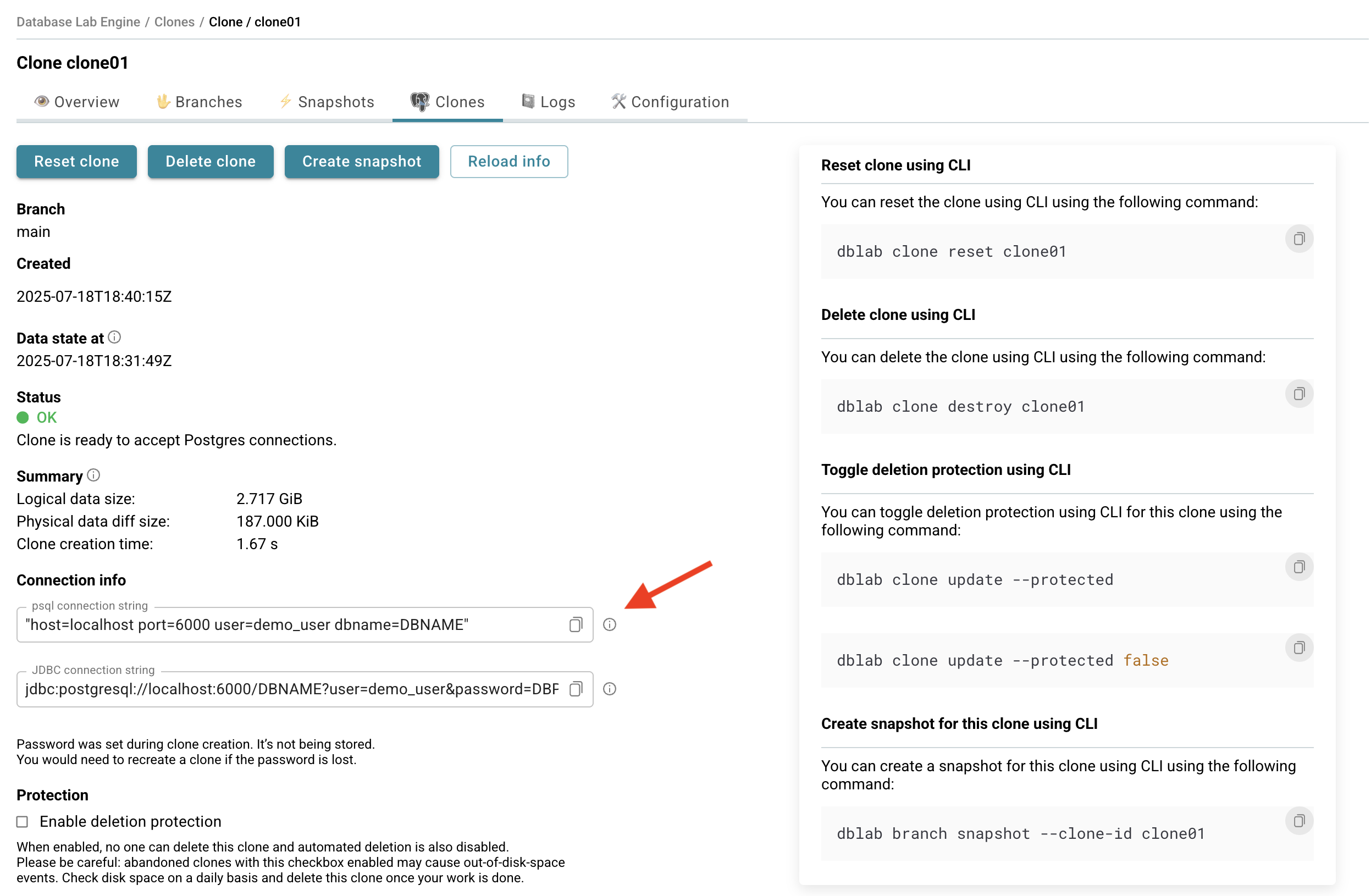
A clone in the DBLab UI, ready for connections 1.67 seconds after it was requested (a 2.7 GiB demo database). How it works
DBLab and Snaplet, side by side
| Question | DBLab | Snaplet |
|---|---|---|
| What it is | Open-source software that gives every developer, CI job and AI agent a writable, full-size copy of a PostgreSQL database in seconds. Thin clones share one physical copy of the data on one machine. docsdocs 2 | Three open-source tools from the former Snaplet: Copycat "generates fake data", Seed "generates realistic synthetic data based off a database schema", and Snapshot captures, transforms and restores database snapshots, with subsetting. 1 |
| Which databases it can copy | YesAny PostgreSQL from version 10 up, wherever it runs. Managed services such as Amazon RDS, Aurora, Cloud SQL and Supabase are copied with dump and restore; self-managed servers can also be copied physically with WAL-G, pgBackRest or pg_basebackup. docsdocs 2 | PartlySnapshot captures from a source database given by SNAPLET_SOURCE_DATABASE_URL, typically production, and is described as a tool for Postgres. The repository is archived and read-only. Seed does not copy a source; it generates data from the schema. 43 |
| How a copy is made | Copy-on-write in the file system, with ZFS or LVM. Clones share unchanged blocks, so a clone takes extra disk space only for what it changes. docs | Snapshot captures data from the source into a snapshot, optionally subset and transformed, and restores it into a target database. Seed reads the schema and inserts generated rows through a TypeScript client. 43 |
| Time to get a copy | A few seconds whatever the database size: under 2 seconds for a 10 TiB database with one user, up to 30 seconds with 15 users at once. The first copy of the source is slow; about 1 TiB an hour is a good speed. docsdocs 2 | Not documented in the sources we reviewed. 43 |
| Data in a copy | YesThe whole database as of the chosen snapshot. Physical mode can follow the source continuously; logical mode is refreshed in full, on a schedule. docsdocs 2 | Partly"Snapshots can be subset (reduced in size), and the source data can be transformed to meet your requirements." Seed creates synthetic rows, not a copy of production data. 43 |
| Masking sensitive data | YesDocumented options: load an anonymized dump, or apply SQL transformations or PostgreSQL Anonymizer before snapshots are taken. You define the rules. docs | YesSnapshot transforms source data while capturing it, for example to obfuscate personally identifiable information. Copycat generates deterministic fake values. Seed avoids real data by generating it. 451 |
| CI and migration testing | YesDB Migration Checker runs pending migrations on a clone in CI, fails those that hold dangerous locks longer than a limit (10 seconds by default) and collects statistics. Any CI job can also create clones through the API or CLI. docs | PartlySnapshot's README says snapshots are restored into a database as part of your workflow, locally or in CI/CD, but the repository is archived. Supabase runs seed files on supabase start and supabase db reset. 42 |
| API, CLI and agent access | REST API, web UI and the dblab CLI. Joe, also available as pgai joe, returns EXPLAIN plans and timings from a clone, not rows. docsdocs 2docs 3 | Command-line tools run with npx: npx @snaplet/seed init, and snapshot capture, ls and restore in @snaplet/snapshot. Seed can use an LLM, with an OpenAI or Groq API key, to generate examples for text columns. 34 |
| Where it runs | YesOn a machine you control, in any cloud or on-premises. DBLab SE installs from the PostgresAI Console or AWS Marketplace. docsdocs 2 | YesThe open-sourced tools run where you run them: on a laptop or in a CI job, installed from npm. The sources we reviewed do not describe a hosted Snaplet service after the shutdown. 341 |
| Open source | YesDBLab Engine is open source under Apache 2.0. docs | YesCopycat, Seed and Snapshot are released under the MIT license, in the supabase-community GitHub organization. 1345 |
| Documented limits | DBLab SE: 2,000 GiB per instance and a single user. All clones share one machine, and copy-on-write storage has different I/O performance, so timings on a clone should not be compared directly with production. docsdocs 2 | Snapshot was archived on May 11, 2026 and is read-only. Seed's latest tagged release is v0.98.0 from July 30, 2024; Supabase says it is community-maintained and "receives only occasional fixes". 462 |
| What you pay for | One machine and one physical copy of the data, however many clones run. DBLab SE is billed hourly by the size of that machine, not by database size or number of clones. docs | Free. The tools are MIT-licensed; you pay only for the machines that run them and the databases they write to. 1 |
Pricing
| Product | Plan | List price | Notes |
|---|---|---|---|
| DBLab | DBLab Engine | Free | Open source, Apache 2.0; you run it |
| DBLab | DBLab SE | From $62/month | Billed hourly by machine size, plus your own cloud costs; 2,000 GiB limit; single user |
| DBLab | DBLab EE | Custom | Annual contract, from $0.2662 per 100 GiB per hour; unlimited database size, SSO |
| Snaplet | Seed | Free | Open source, MIT; community-maintained in supabase-community/seed 32 |
| Snaplet | Snapshot | Free | Open source, MIT; repository archived on May 11, 2026 4 |
| Snaplet | Copycat | Free | Open source, MIT 5 |
List prices on 18 Nov 2026. The billing units differ, so this is not a total-cost comparison. DBLab pricing
Questions
- What happened to Snaplet?
- Snaplet shut down in 2024. On August 14, 2024 Supabase announced that Snaplet's three main tools, Copycat, Seed and Snapshot, were released under the MIT license and that Supabase would move them into its GitHub organization. Supabase's docs say Snaplet "wound down as a company in 2024 and open-sourced its tooling". 12
- What can I use instead of Snaplet?
- It depends on the job. To seed a dev database with fake data, Seed is the same tool, open-sourced and community-maintained, and Supabase's docs still cover it. To work on a full-size copy of production, DBLab gives thin clones of PostgreSQL with masking rules you define. DBLab does not generate seed data or subsets. 23
- Is Snaplet Seed still maintained?
- Supabase's docs say @snaplet/seed is community-maintained at supabase-community/seed and "receives only occasional fixes", so they treat it as an optional convenience. The latest tagged release is v0.98.0 from July 30, 2024. 26
- Is Snaplet Snapshot still available?
- The code is on GitHub under MIT at supabase-community/snapshot, but the repository was archived on May 11, 2026 and is read-only. 4
Try a clone before you install anything
The public demo runs DBLab Engine: open it with the token demo-token, create a clone and connect to it. DBLab Engine is open source, so the next step is a machine of your own.
Sources
- Supabase blog: Snaplet is now open source
- Supabase docs: seeding your database
- supabase-community/seed repository
- supabase-community/snapshot repository
- supabase-community/copycat repository
- supabase-community/seed releases
These pages compare what each product does for PostgreSQL; other databases and the rest of the stack are out of scope. What we say about the other product comes from its own documentation, pricing page, changelog or source repository, read on the date shown; each row cites its source. "Not documented" means we did not find it in those sources, not that the product cannot do it. Prices are list prices and the billing units differ, so they are not a total-cost comparison. Product names are trademarks of their owners. Found a mistake? Tell us and we will correct the page.
More comparisons
- Delphixopen-source thin clones vs a test data platform
- Redgate Test Data ManagerPostgres clones vs mask and subset
- Tonic.aithin clones vs de-identified database copies
- Amazon Aurora cloningclones of any Postgres vs Aurora clusters
- Amazon RDS Blue/Green Deploymentstest clones vs a switchover
- Amazon RDS snapshot restorethin clones vs a new instance each
- Ardentself-hosted thin clones vs a replicated branch service
- Cloud SQL cloningthin clones vs a new Cloud SQL instance
- All comparisons