PostgresAI vs Redgate Monitor
open source vs captured plans and alerts
Redgate Monitor watches PostgreSQL with auto_explain plans, top waits and alerts. PostgresAI is open source and covers Amazon RDS, which Redgate marks as preview.
Where PostgresAI is ahead of Redgate Monitor
Each point pairs what our documentation says with what the Redgate Monitor documentation says. Follow the links and check.
The same checks wherever Postgres runs
PostgresAIAmazon RDS and Aurora, Google Cloud SQL, Azure Database for PostgreSQL, Supabase, Tiger Data, self-managed servers and Postgres running on Kubernetes. docs
Redgate MonitorRedgate Monitor supports PostgreSQL on Linux and Windows hosts, Aurora, Azure Flexible Server, Cloud SQL and AlloyDB. Amazon RDS for PostgreSQL is marked preview, and monitoring logical replication is not supported. 4
Open source, no licence fee to self-host
PostgresAIThe monitoring software is open source under Apache 2.0, so self-hosting it carries no licence fee. docsdocs 2
Redgate MonitorRedgate Monitor is sold as a subscription: Standard (Self-hosted) lists $1,233 per server a year for 1 to 4 servers. The sources we reviewed do not describe it as open source. 2
An AI agent can work through the findings
PostgresAIThe postgresai CLI and an MCP server give an agent the Issues, action items and checkup reports. The setup guide covers Cursor, Claude Code, Windsurf and Codex. docsdocs 2
Redgate MonitorRedgate Monitor has a read-only MCP server for self-hosted Monitor 14.28 and later. Redgate states that it is not available on Redgate Monitor SaaS. 7
Test the fix on a full-size copy first
Short answer
Redgate Monitor monitors PostgreSQL from a self-hosted Base Monitor or as Redgate Monitor SaaS. For Postgres it shows top queries, plans captured by auto_explain, top waits, configuration advice and 13 alerts, and Redgate Assistant explains slow queries. PostgresAI monitors PostgreSQL, runs scheduled checkups and turns findings into Issues that you, your AI agent or a PostgresAI expert can act on. Pick Redgate Monitor if you want captured plans compared side by side and a SaaS or self-hosted choice with published per-server prices. Pick PostgresAI if you want open-source monitoring, scheduled checkups or human experts.
When Redgate Monitor is the better choice
- Captures PostgreSQL execution plans with auto_explain, and Query Compare shows two captured plans of the same query side by side.
- Self-hosted Base Monitor on Windows or Linux, or Redgate Monitor SaaS hosted on AWS in an EU or US region with a tenancy per customer.
- Top waits for PostgreSQL, filterable by database, link each wait type or event to the queries that waited.
- Redgate Assistant, generally available since 14.40.0, explains slow PostgreSQL queries from their text and plan; a read-only MCP server is available for self-hosted installs.
- A Configuration tab compares each PostgreSQL instance's settings with recommendations, and an estate-level PostgreSQL tab shows which clusters' settings have drifted.
What you get
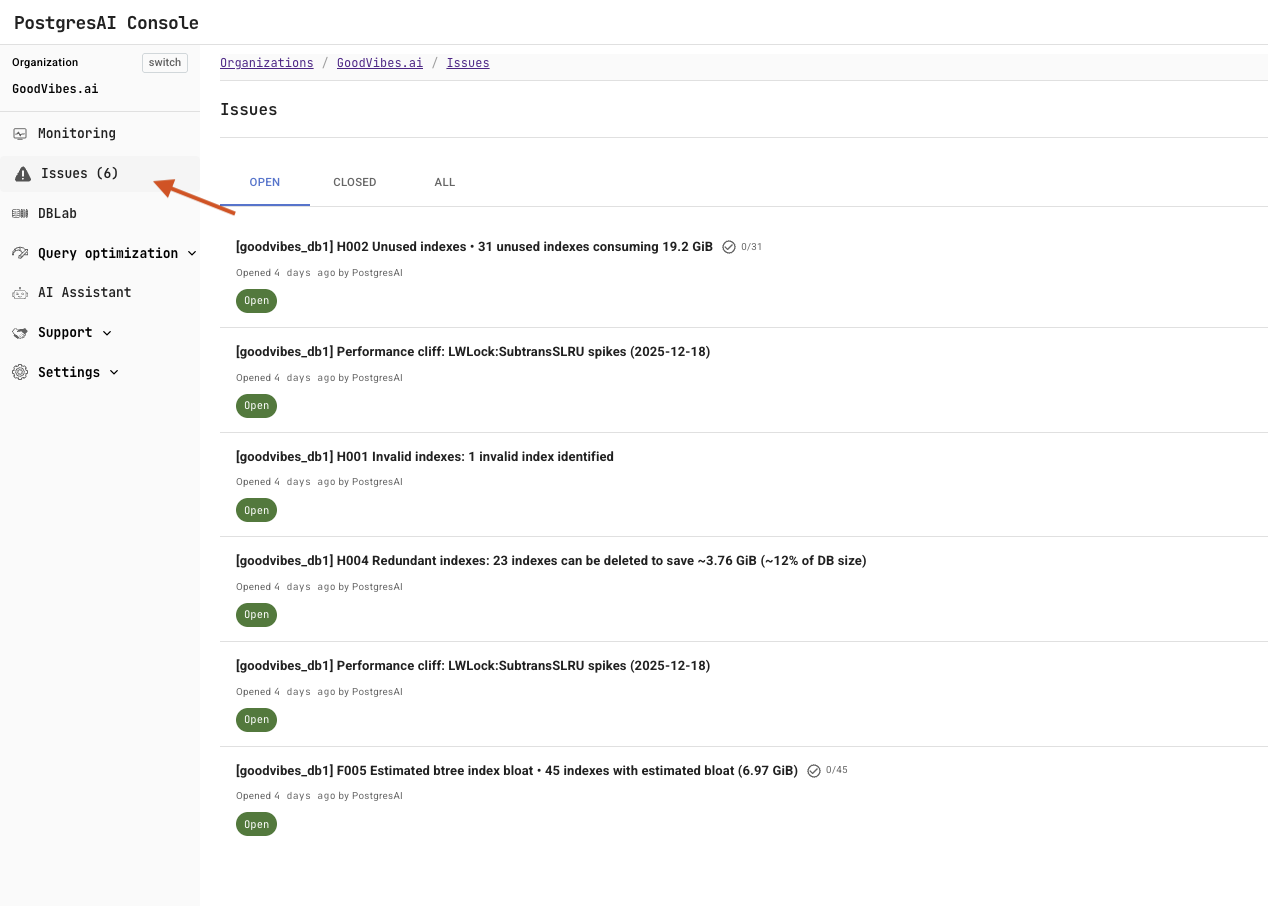
Checkup findings as Issues in the PostgresAI Console. How it works
PostgresAI and Redgate Monitor, side by side
| Question | PostgresAI | Redgate Monitor |
|---|---|---|
| What it is | PostgreSQL monitoring with scheduled health checkups. Findings become Issues with severity, evidence and a recommended fix, which you, your AI agent or a PostgresAI expert can act on. docsdocs 2 | Database estate monitoring that covers PostgreSQL. A Base Monitor collects data into a repository database you run, which can be PostgreSQL with TimescaleDB, or Redgate runs it for you as Redgate Monitor SaaS. 1312 |
| Where your Postgres can run, and which versions | YesAmazon RDS and Aurora, Google Cloud SQL, Azure Database for PostgreSQL, Supabase, Tiger Data, self-managed servers and Postgres running on Kubernetes. PostgreSQL 14 and newer, with the pg_stat_statements extension. docs | YesPostgreSQL 10 to 18 on Linux (Ubuntu, RHEL, Rocky, SLES) or Windows hosts, on VMs in Azure, EC2 and Compute Engine, plus Aurora PostgreSQL, Azure Flexible Server, Cloud SQL and AlloyDB. Amazon RDS for PostgreSQL is marked preview. Windows hosts need a Windows Base Monitor; logical replication is not monitored. 4 |
| Where it runs and what it collects | YesHosted by PostgresAI, or self-hosted in your own cloud account or on your own server. It collects database metadata such as statistics, normalized query texts and wait events, not table data or query parameters. docsdocs 2 | YesSelf-hosted Base Monitor on Windows or on Linux with .NET 10 (Docker tested), storing data in a repository database; a PostgreSQL repository needs version 16 or newer with TimescaleDB 2.17+ Community Edition and the Toolkit. Redgate Monitor SaaS is hosted by Redgate on AWS in an EU or US region. 312 |
| Open source | YesThe monitoring software is open source under Apache 2.0. Hosted plans are a separate paid service. docsdocs 2 | Not documentedNot documented in the sources we reviewed. Redgate Monitor is sold as a subscription priced per server per year. 2 |
| Query performance analysis | YesTop queries from pg_stat_statements by calls, execution time, planning time and rows, with a drill-down dashboard for a single query. For execution plans, Joe runs EXPLAIN on a DBLab clone. docsdocs 2 | YesQuery statistics from pg_stat_statements and execution plans captured by auto_explain from the server log. Query Compare highlights differences between two captured plans. Query analysis in Redgate Assistant gives AI explanations and tuning suggestions for PostgreSQL queries. 5109 |
| Wait event analysis | YesAn ASH-style wait event dashboard built from samples of pg_stat_activity. No extra extension is needed. docs | YesTop waits for PostgreSQL on the server overview and database pages since 14.10.0, with a link from each wait type or event to the queries that waited. The sources we reviewed do not state the sampling interval. 810 |
| Health checks and recommendations | YesScheduled checkup reports on settings, autovacuum and bloat, and indexes (invalid, unused, redundant). Each finding becomes an Issue with severity, evidence and a specific fix. docsdocs 2 | YesA Configuration tab compares PostgreSQL settings with recommendations, an estate-level PostgreSQL tab shows settings drift across clusters, a Databases section shows unused indexes, and a table bloat alert fires when dead tuples pass a threshold. 1110 |
| AI and agent access | YesThe postgresai CLI (alias pgai) and an MCP server with tools for Issues, action items and checkup reports. The setup guide covers Cursor, Claude Code, Windsurf and Codex. docsdocs 2 | PartlyAn MCP server for self-hosted Monitor 14.28 and later, with read-only tools; for PostgreSQL it returns servers, metrics, top queries, query details, plans and alerts. It is not available on Redgate Monitor SaaS. It shipped in preview in 14.28.0 and is listed without a preview label in 14.36.0. Redgate Assistant became generally available in 14.40.0. 7811 |
| Testing a fix before production | YesWith DBLab Engine, a separate open-source product: a full-size thin clone of the database in seconds, where an index or query change can be run on real data. DBLab is set up and priced separately. docsdocs 2 | Not documentedNot documented in the sources we reviewed. Query Compare compares captured plans and Redgate Assistant suggests tuning; the sources do not describe running a change on a separate copy of the data. 109 |
| Human PostgreSQL experts | YesScale includes two expert requests a month, answered within 24 business hours. Either plan can buy a one-off pack of two requests for $500. Consulting is separate. docsdocs 2 | Not documentedNot documented in the sources we reviewed. The product page points to Redgate support, training resources and a community, not to PostgreSQL experts. 1 |
| Alerts | Email and Slack alerts on Starter and Scale. docs | 13 alerts for PostgreSQL on Linux, including long-running query, long-running and idle transactions, configuration change, replica role change, low cache hit ratio, server log entry and table bloat percentage. 6 |
| History kept | 14 days on Starter, 13 months on Scale, custom on Enterprise. docs | Not documented in the sources we reviewed. 112 |
| Security attestations | SOC 2 Type 2 examination completed for the Security and Availability criteria, covering March 4 to June 4, 2026. The SOC 3 report is public. docs | Redgate states that it is ISO 27001:2022 certified. Redgate Monitor SaaS gives each customer its own tenancy. The sources we reviewed do not mention SOC 2. 1312 |
Pricing
| Product | Plan | List price | Notes |
|---|---|---|---|
| PostgresAI | Starter | $16 per cluster/month | Primary only, 14-day retention, no expert requests included |
| PostgresAI | Scale | $512 per cluster/month | Primary and up to 5 replicas in one cluster, 13-month retention, Grafana dashboards, 2 expert requests a month |
| PostgresAI | Enterprise | Custom | Contact sales |
| PostgresAI | Self-hosted | No licence fee | Open source under Apache 2.0; you run it yourself |
| Redgate Monitor | Standard (Self-hosted) | $1,233 per server/year | List price for 1-4 servers; $1,170 for 5-9 and $1,110 for 10-19 servers, 20+ by quote; monitoring with alerts and diagnostics; 14-day free trial 21 |
| Redgate Monitor | Standard (SaaS) | $1,581 per server/year | List price for 5-9 servers; $1,500 for 10-19 servers, 20+ by quote; hosted by Redgate 2 |
| Redgate Monitor | Enterprise | Contact us | Adds security monitoring and auditing, high availability architecture, a Data API and a sensitive action log; SaaS Enterprise excludes the Data API and sensitive action log 111 |
List prices on 18 Nov 2026. The billing units differ, so this is not a total-cost comparison. Prices are the figures the Redgate pricing page showed in US dollars, excluding tax, for a 1 year subscription; the page loads them in the browser. One license covers one server, or one node of a managed service such as Aurora, Azure Flexible Server or Cloud SQL. PostgresAI pricing
Using PostgresAI with Redgate Monitor
DBLab is a separate product that copies any PostgreSQL source, so a team that monitors with Redgate Monitor can still use a DBLab clone to try an index or query change on full-size data before production.
Questions
- Does Redgate Monitor support PostgreSQL?
- Yes. Redgate Monitor supports PostgreSQL 10 to 18 on Linux and Windows hosts, Aurora PostgreSQL, Azure Flexible Server, Cloud SQL and AlloyDB. Amazon RDS for PostgreSQL is marked preview. 4
- Does Redgate Monitor capture PostgreSQL execution plans?
- Yes. It uses pg_stat_statements for query statistics and auto_explain to capture plans; on Cloud SQL and AlloyDB auto_explain is turned on with a database flag. Query Compare highlights differences between two captured plans. 510
- Is Redgate Monitor self-hosted or SaaS?
- Both. The Base Monitor can run on your own Windows or Linux servers, or you can use Redgate Monitor SaaS, hosted on AWS in an EU or US region. The MCP server is available only on self-hosted installs. 3127
- What does Redgate Monitor cost?
- Standard (Self-hosted) lists $1,233 per server per year for 1 to 4 servers, $1,170 for 5 to 9 and $1,110 for 10 to 19, excluding tax. Standard (SaaS) lists $1,581 per server per year for 5 to 9 servers and $1,500 for 10 to 19. Enterprise and 20 or more servers are priced on request. A 14-day free trial is offered. 21
- Can I use PostgresAI and Redgate Monitor together?
- Yes. DBLab, the PostgresAI cloning product, copies any PostgreSQL source, so a team that monitors with Redgate Monitor can test an index or query change on a full-size DBLab clone before production.
Check it on your own database
The express checkup works with PostgreSQL 14 or newer. With --no-upload it needs no account and sends no report data to PostgresAI. It needs Node.js 18 or newer and a database role with pg_monitor. Compare what it finds with what your current tool shows for the same database.
Sources
- Redgate Monitor product page
- Redgate Monitor pricing
- Redgate Monitor documentation: supported platforms
- Redgate Monitor documentation: monitored PostgreSQL instances
- Redgate Monitor documentation: PostgreSQL configuration choices
- Redgate Monitor documentation: PostgreSQL on Linux metrics and alerts
- Redgate Monitor documentation: connecting an MCP client
- Redgate Monitor 14 release notes
- Redgate Monitor documentation: query analysis
- Redgate blog: compare queries, spot unused indexes and diagnose waits in Postgres
- Redgate blog: Redgate Monitor product updates, September 2026
- Redgate Monitor documentation: what is Redgate Monitor SaaS
- Redgate Trust Center
These pages compare what each product does for PostgreSQL; other databases and the rest of the stack are out of scope. What we say about the other product comes from its own documentation, pricing page, changelog or source repository, read on the date shown; each row cites its source. "Not documented" means we did not find it in those sources, not that the product cannot do it. Prices are list prices and the billing units differ, so they are not a total-cost comparison. Product names are trademarks of their owners. Found a mistake? Tell us and we will correct the page.
More comparisons
- CorootPostgres experts and history vs eBPF query capture
- Datadog Database Monitoringopen source vs traced queries
- Dynatraceopen-source monitoring vs an ActiveGate extension
- Foglight for PostgreSQLopen source vs workload drill-down
- Grafana Cloud Database Observabilitycheckups vs query data
- Netdatawait events and experts vs per-second metrics
- New Relicopen source with experts vs queries tied to traces
- SolarWinds DPAopen source vs commercial wait-time analysis
- All comparisons