PostgresAI vs pgEdge AI DBA Workbench
human experts vs an AI assistant
pgEdge AI DBA Workbench is open-source, self-hosted monitoring with an AI assistant. PostgresAI adds a wait event dashboard and PostgreSQL experts on Scale.
Where PostgresAI is ahead of pgEdge AI DBA Workbench
Each point pairs what our documentation says with what the pgEdge AI DBA Workbench documentation says. Follow the links and check.
Wait events with no extra extension
PostgresAIAn ASH-style wait event dashboard built from samples of pg_stat_activity. No extra extension is needed. docs
PostgreSQL experts on the plan
PostgresAIScale includes two expert requests a month, answered within 24 business hours. Either plan can buy a one-off pack of two requests for $500. docsdocs 2
pgEdge AI DBA WorkbenchThe pgEdge AI DBA Workbench product page says pgEdge Enterprise Postgres subscribers receive support at no extra cost. The sources we reviewed do not describe PostgreSQL consulting as part of the Workbench. 1
Metadata only, and it can stay with you
Test the fix on a full-size copy first
Short answer
pgEdge AI DBA Workbench is open-source PostgreSQL monitoring that you run yourself: a collector, an alerter with threshold rules and three-tier anomaly detection, an MCP server and a web client with an AI assistant, Ellie, that can use cloud or local LLMs. PostgresAI monitors Postgres, runs scheduled checkups and turns findings into Issues that you, your AI agent or a PostgresAI expert can act on, hosted or self-hosted. Pick the Workbench for a free, self-hosted stack with a built-in assistant that can run on a local model. Pick PostgresAI for a hosted option, human experts on the plan, or DBLab clones to test a fix.
When pgEdge AI DBA Workbench is the better choice
- Open source under the PostgreSQL License and free to download; the product page lists it as Free (OSS).
- A built-in AI assistant, Ellie, that can query metrics, inspect schemas and run EXPLAIN ANALYZE, with Anthropic, OpenAI, Gemini, Ollama or any OpenAI-compatible endpoint, including fully local models.
- Anomaly detection in three tiers: z-score baselines, embedding similarity with pgvector, and LLM classification that decides whether to alert.
- Self-hosted and can run air-gapped; the product page says your data never leaves your infrastructure.
- Support at no extra cost for pgEdge Enterprise Postgres subscribers.
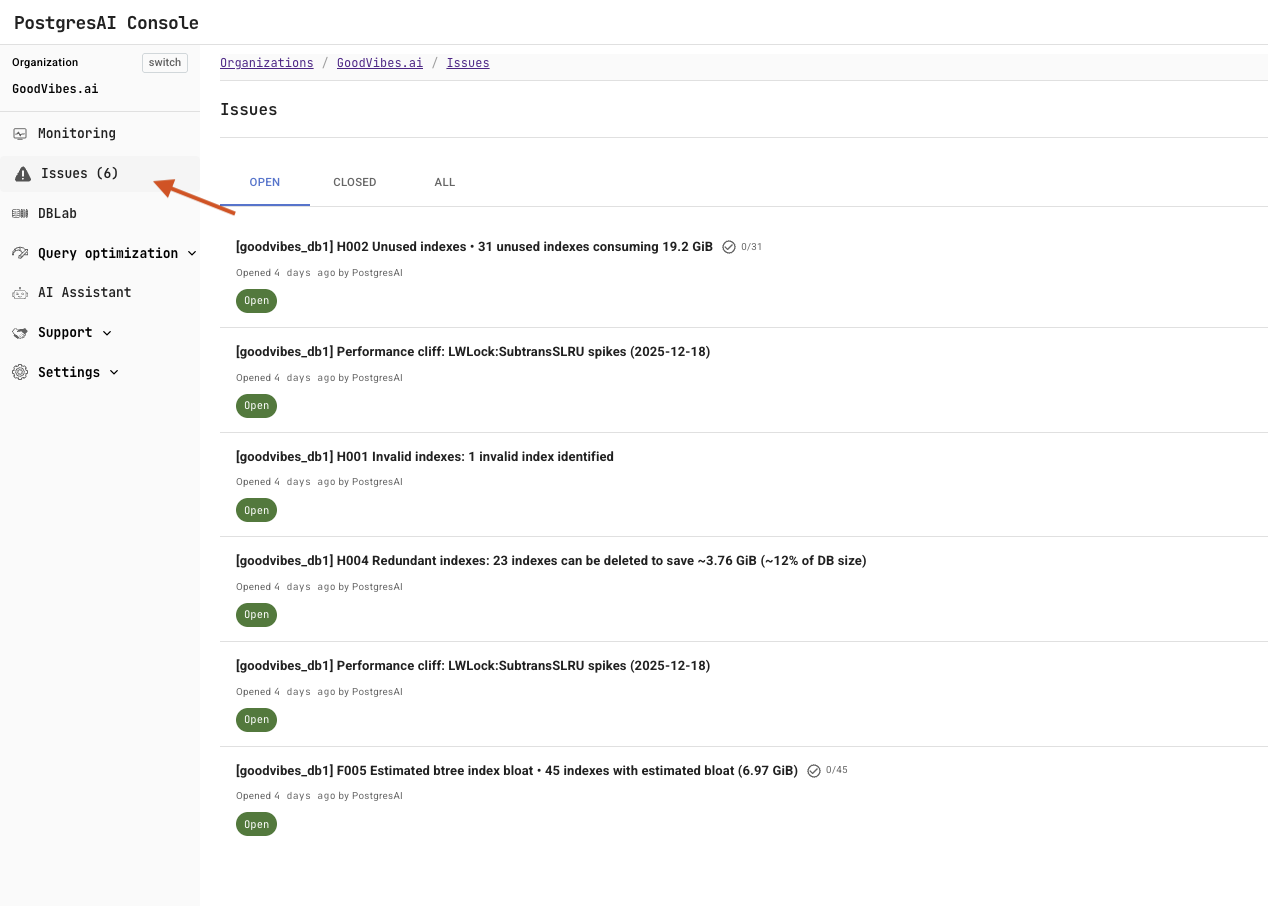
What you get
Checkup findings as Issues in the PostgresAI Console. How it works
PostgresAI and pgEdge AI DBA Workbench, side by side
| Question | PostgresAI | pgEdge AI DBA Workbench |
|---|---|---|
| What it is | PostgreSQL monitoring with scheduled health checkups. Findings become Issues with severity, evidence and a recommended fix, which you, your AI agent or a PostgresAI expert can act on. docsdocs 2 | Self-hosted PostgreSQL monitoring and management in four parts: a Collector that stores metrics in a central datastore, an Alerter with thresholds and anomaly detection, a Server with MCP tools and a REST API, and a web Client with dashboards and the Ellie assistant. AI features are optional. 123 |
| Where your Postgres can run, and which versions | YesAmazon RDS and Aurora, Google Cloud SQL, Azure Database for PostgreSQL, Supabase, Tiger Data, self-managed servers and Postgres running on Kubernetes. PostgreSQL 14 and newer, with the pg_stat_statements extension. docs | YesThe product page says it runs on any PostgreSQL 14+ instance, including Amazon RDS, Azure Database for PostgreSQL, Google Cloud SQL, Supabase and pgEdge Cloud; the repository README says v15+. The collector connects remotely, with no agent on the database host. Spock replication status is exposed for pgEdge clusters. 13 |
| Where it runs and what it collects | YesHosted by PostgresAI, or self-hosted in your own cloud account or on your own server. It collects database metadata such as statistics, normalized query texts and wait events, not table data or query parameters. docsdocs 2 | YesSelf-hosted only in the sources we reviewed: binaries, source build, Docker images or pgEdge packages, and air-gapped installs. The pg_stat_activity probe collects query text and client addresses; the pg_stat_statements probe collects normalized queries. 135 |
| Open source | YesThe monitoring software is open source under Apache 2.0. Hosted plans are a separate paid service. docsdocs 2 | YesOpen source under the PostgreSQL License, on GitHub. The product page lists the price as Free (OSS). 31 |
| Query performance analysis | YesTop queries from pg_stat_statements by calls, execution time, planning time and rows, with a drill-down dashboard for a single query. For execution plans, Joe runs EXPLAIN on a DBLab clone. docsdocs 2 | YesA pg_stat_statements probe every 5 minutes keeps the top 1000 queries by total execution time, with planning, I/O, WAL and JIT columns. The server dashboard ranks top queries by resource consumption and shows execution time, calls and rows. Ellie and the MCP server can run EXPLAIN ANALYZE. 5610 |
| Wait event analysis | YesAn ASH-style wait event dashboard built from samples of pg_stat_activity. No extra extension is needed. docs | PartlyThe pg_stat_activity probe records wait_event_type and wait_event every 60 seconds by default. The sources we reviewed do not describe a dedicated wait event dashboard. 56 |
| Health checks and recommendations | YesScheduled checkup reports on settings, autovacuum and bloat, and indexes (invalid, unused, redundant). Each finding becomes an Issue with severity, evidence and a specific fix. docsdocs 2 | YesBuilt-in alert rules for connections, blocking, long queries, replication, disk, dead tuples, table bloat, stale autovacuum, transaction ID age and checkpoints. An AI analysis of a server or cluster reviews configuration, alerts and metric trends and returns SQL with a Run button; write statements ask for confirmation. 712 |
| AI and agent access | YesThe postgresai CLI (alias pgai) and an MCP server with tools for Issues, action items and checkup reports. The setup guide covers Cursor, Claude Code, Windsurf and Codex. docsdocs 2 | YesAn MCP server at /mcp/v1 over HTTP or HTTPS with token auth; the v1.0.0 docs list 22 tools: SQL and EXPLAIN on monitored databases, metric history, alerts, baselines, blackouts and an event timeline. Ellie in the web client uses the same tools. 10111 |
| Testing a fix before production | YesWith DBLab Engine, a separate open-source product: a full-size thin clone of the database in seconds, where an index or query change can be run on real data. DBLab is set up and priced separately. docsdocs 2 | PartlyEllie and the MCP tools can run EXPLAIN ANALYZE and validate SQL without running it, on a monitored database. The sources we reviewed do not describe running a change on a separate copy of the data. 1011 |
| Human PostgreSQL experts | YesScale includes two expert requests a month, answered within 24 business hours. Either plan can buy a one-off pack of two requests for $500. Consulting is separate. docsdocs 2 | PartlyThe product page says pgEdge Enterprise Postgres subscribers receive support at no extra cost. The sources we reviewed do not describe PostgreSQL consulting as part of the Workbench. 1 |
| Alerts | Email and Slack alerts on Starter and Scale. docs | Threshold rules plus anomaly detection: z-score baselines, embedding similarity against past anomalies, then LLM classification. Notification channels: email, Slack, Mattermost and webhooks. Blackout windows suppress alerts. 897 |
| History kept | 14 days on Starter, 13 months on Scale, custom on Enterprise. docs | Set per probe. Defaults are 7 days for most probes, including pg_stat_statements and pg_stat_activity, and 365 days for settings and HBA probes. Retention can be changed per probe in the datastore. 514 |
| Security attestations | SOC 2 Type 2 examination completed for the Security and Availability criteria, covering March 4 to June 4, 2026. The SOC 3 report is public. docs | The sources we reviewed do not describe security attestations for the Workbench. It is self-hosted, so metrics stay in your own datastore. 1 |
Pricing
| Product | Plan | List price | Notes |
|---|---|---|---|
| PostgresAI | Starter | $16 per cluster/month | Primary only, 14-day retention, no expert requests included |
| PostgresAI | Scale | $512 per cluster/month | Primary and up to 5 replicas in one cluster, 13-month retention, Grafana dashboards, 2 expert requests a month |
| PostgresAI | Enterprise | Custom | Contact sales |
| PostgresAI | Self-hosted | No licence fee | Open source under Apache 2.0; you run it yourself |
| pgEdge AI DBA Workbench | Open source | Free | PostgreSQL License; you run it. LLM costs depend on the provider you configure, or none with a local model 13 |
List prices on 18 Nov 2026. The billing units differ, so this is not a total-cost comparison. Support comes with a pgEdge Enterprise Postgres subscription; the product page gives no separate price for it. PostgresAI pricing
Using PostgresAI with pgEdge AI DBA Workbench
DBLab is a separate product that copies any PostgreSQL source, so a team that monitors with pgEdge AI DBA Workbench can still use a DBLab clone to try an index or query change on full-size data before production.
Questions
- Is pgEdge AI DBA Workbench open source?
- Yes. It is released under the PostgreSQL License, with source, binaries and Docker images on GitHub. PostgresAI monitoring is also open source, under Apache 2.0. 32
- Does pgEdge AI DBA Workbench work with Amazon RDS?
- Yes. The product page says it runs on any PostgreSQL 14+ instance, including Amazon RDS and Supabase; the repository README says v15+. The collector connects over the network, so nothing is installed on the database host. 13
- Which LLMs can pgEdge AI DBA Workbench use?
- Anthropic, OpenAI and Gemini with an API key, Ollama, or any server with an OpenAI-compatible API such as LM Studio. Monitoring, alerting and dashboards keep working with no LLM configured. 13121
- Is pgEdge AI DBA Workbench generally available?
- Version 1.0.0 was released in June 2026 and is the latest release on GitHub. A 2.0.0-beta1 pre-release was published on November 12, 2026. 42
- Can I use PostgresAI and pgEdge AI DBA Workbench together?
- DBLab, the PostgresAI cloning product, copies any PostgreSQL source, so a team that monitors with the Workbench can test an index or query change on a full-size DBLab clone before production.
Check it on your own database
The express checkup works with PostgreSQL 14 or newer. With --no-upload it needs no account and sends no report data to PostgresAI. It needs Node.js 18 or newer and a database role with pg_monitor. Compare what it finds with what your current tool shows for the same database.
Sources
- pgEdge AI DBA Workbench product page
- pgEdge AI DBA Workbench documentation v1.0.0: architecture overview
- pgEdge AI DBA Workbench repository
- pgEdge AI DBA Workbench releases
- AI DBA Workbench documentation: probe reference
- AI DBA Workbench documentation: server dashboard
- AI DBA Workbench documentation: alert rule reference
- AI DBA Workbench documentation: anomaly detection
- AI DBA Workbench documentation: notification channels
- AI DBA Workbench documentation: MCP tools
- AI DBA Workbench documentation: Ask Ellie
- AI DBA Workbench documentation: AI overview
- AI DBA Workbench documentation: server configuration (LLM providers)
- AI DBA Workbench documentation: collector configuration
These pages compare what each product does for PostgreSQL; other databases and the rest of the stack are out of scope. What we say about the other product comes from its own documentation, pricing page, changelog or source repository, read on the date shown; each row cites its source. "Not documented" means we did not find it in those sources, not that the product cannot do it. Prices are list prices and the billing units differ, so they are not a total-cost comparison. Product names are trademarks of their owners. Found a mistake? Tell us and we will correct the page.
More comparisons
- Datasentinelopen source with fixes vs session and plan data
- EDB Postgres Enterprise Managerany Postgres vs EDB fleets
- pganalyzeopen source vs plan and log insights
- pgDashopen source with wait events vs pgmetrics reports
- pgMustardwhole-database monitoring vs one plan at a time
- Amazon DevOps Guru for RDSany cloud vs ML on RDS (closing)
- Azure PostgreSQL built-in toolsany provider vs Azure only
- Cloud SQL Query Insightsany provider vs inside Cloud SQL
- All comparisons