DBLab vs Atlas
run a change on real data vs plan and lint it
Atlas plans, lints and applies schema changes as code, verified on an empty dev database. DBLab runs the result on a full-size clone and measures the locks it holds.
What DBLab adds to Atlas
Each point pairs what our documentation says with what the Atlas documentation says. Follow the links and check.
Runs the migration on full-size data
DBLabDB Migration Checker applies pending migrations to a full-size clone in CI and collects statistics from the run. docs
Measures the locks a migration holds
DBLabThe checker fails a migration that holds a dangerous lock longer than a limit, 10 seconds by default. docs
Open source and self-hosted
DBLabDBLab Engine is open source under Apache 2.0 and runs in any cloud or on-premises. docs
Run it again from the same state
DBLabOn a clone, reset returns the data to the snapshot, so a migration can be run again. docs
Short answer
Atlas manages schemas as code: a declarative workflow that diffs a desired schema against the database, and a versioned workflow with planned, linted migration files. Its Pro analyzers predict PostgreSQL lock and rewrite risks from the SQL, and it verifies changes on a dev database, which must be empty. DBLab does not write, plan or deploy migrations. It gives you a full-size thin clone of a PostgreSQL database where a change runs on real data, so you see its duration and locks. The two fit together: Atlas plans and lints, DBLab runs the result on a clone.
What Atlas does that DBLab does not
- Atlas is the change process itself: declarative schema-as-code in HCL, SQL or an ORM, or versioned migration files that it plans for you. DBLab covers none of these steps.
- PostgreSQL-specific Pro checks name the lock or rewrite a statement causes, such as PG101, an index built without CONCURRENTLY, and PG305, a CHECK constraint that requires a full table scan.
- Profiling, in preview, measures the locks, rewrites and disk use of each statement during a test, and an expect "profile" block can fail the test when a lock lasts longer than a bound.
- Pro adds schema plans that are reviewed and approved in pull requests or the Atlas Registry, drift detection and audit trails.
- GitHub Actions cover lint, test, plan, apply and drift, and the docs list GitLab CI, CircleCI, Bitbucket Pipes and Azure DevOps integrations.
What you get
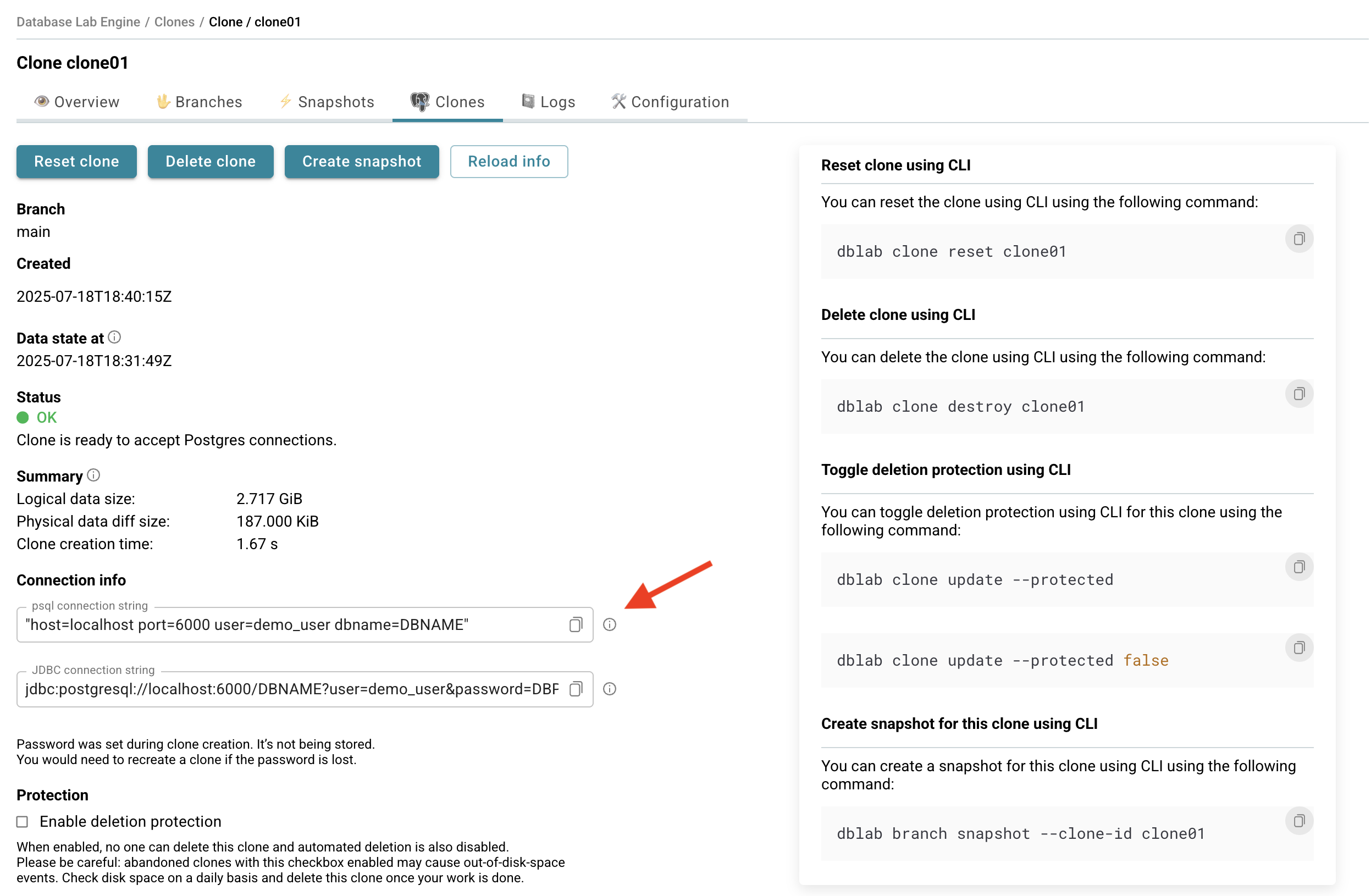
A clone in the DBLab UI, ready for connections 1.67 seconds after it was requested (a 2.7 GiB demo database). How it works
DBLab and Atlas, side by side
| Question | DBLab | Atlas |
|---|---|---|
| What it is | Thin clones of a full-size PostgreSQL database, used to run a schema change on real data before it ships. DBLab does not write, order or deploy migrations. docsdocs 2 | A language-independent tool for managing and migrating database schemas. The declarative workflow works like Terraform: it compares the database with the desired schema, then plans and applies the difference. The versioned workflow plans, lints and applies migration files. Schemas are written in HCL, SQL or an ORM. 1 |
| Runs the change on full-size data | YesDB Migration Checker applies pending migrations to a full-size clone in CI and collects statistics from the run. docs | PreviewTests run on the dev database, which Atlas requires to be empty. Datasets can load rows from an Amazon RDS snapshot export, CSV files or synthetic data, optionally sampled; the docs say a test rarely needs the whole export. Datasets are in preview for a subset of Teams and Enterprise customers. 567 |
| Lock and downtime risk | YesMeasured on the clone: the checker fails a migration that holds a dangerous lock longer than a limit, 10 seconds by default. docs | PreviewPredicted from the SQL by Pro analyzers: PG101 to PG109 for index and constraint builds that lock the table, PG301 to PG320 for blocking and table-rewrite changes. Measured with --profile, which reports the locks each statement takes and for how long on the dev database, and can fail a test past a set bound; profiling is in preview, and the docs say empty tables make every lock short. 36 |
| Static review and lint rules | NoNone. DBLab runs the change; it does not lint SQL. docs | Yesatlas migrate lint analyzes migration files for destructive, data-dependent, backward-incompatible and locking changes. Since v0.38 it is available only to Atlas Pro users. The concurrent index, blocking and nested transaction analyzers are marked Pro; destructive and data-dependent checks are not. 43 |
| Writing, versioning and deploying migrations | NoNot provided. Keep your migration tool; a clone is an ordinary PostgreSQL server that any tool can connect to. docs | YesVersioned: Atlas plans migration files from schema changes, then lints and applies them; each file runs in its own transaction by default. Declarative: atlas schema apply moves the database to the desired state, and Pro users can pre-plan, review and approve the plan first. 11211 |
| Approvals and audit trail | NoNot a change-approval system. DBLab EE adds SSO, user management and audit for access to clones. docs | Yesatlas schema plan, Pro only, stores a plan in the Atlas Registry, where it is approved from the CLI, the Registry UI or a pull request workflow; a lint-review policy asks for human review only when the linter finds issues. Protected Flows limit who can push or approve. Audit trails are listed on Pro. 112 |
| Rollback | Not provided for production. On a clone, reset returns the data to the snapshot, so a migration can be run again. docs | Migration files are roll-forward in a linear history, but atlas migrate down can revert changes made by specific files. Down migrations are among the features the open-source Community Edition omits. 138 |
| CI integration | The checker runs in CI; the documented example uses GitHub Actions. Any pipeline can also create clones through the API or CLI. docsdocs 2 | GitHub Actions for migrate lint, test, apply, down and drift and for schema plan, lint, test and apply; the drift actions need an Atlas Pro cloud token. The docs also list GitLab CI Components, CircleCI Orbs, Bitbucket Pipes and Azure DevOps. 94 |
| Open source and hosting | YesOpen source under Apache 2.0, self-hosted in any cloud or on-premises. docs | PartlyThe CLI source on GitHub is under Apache 2.0, and a Community Edition built from it omits linting, testing, schema plan, drift detection, down migrations, integrations and database objects such as views, triggers and functions. The standard binary adds proprietary features and is free to download under the Atlas MSA; atlas login unlocks Pro. Atlas Cloud hosts the Registry, Pipelines and schema monitoring. 8102 |
Pricing
| Product | Plan | List price | Notes |
|---|---|---|---|
| DBLab | DBLab Engine | Free | Open source, Apache 2.0; you run it |
| DBLab | DBLab SE | From $62/month | Billed hourly by machine size, plus your own cloud costs; 2,000 GiB limit; single user |
| DBLab | DBLab EE | Custom | Annual contract, from $0.2662 per 100 GiB per hour; unlimited database size, SSO |
| Atlas | Starter | Free | Includes PostgreSQL; ORM integration, migration planning and execution; basic database features 2 |
| Atlas | Pro | $9 per user/month | Up to 50 seats; migration linting, drift detection, schema policy, audit trails; usage-based charges on top 2 |
| Atlas | Atlas Pipelines (Pro) | $59 per project/month | Includes 2 target databases; $39/month per additional target; 90-day history 2 |
| Atlas | Schema Monitoring (Pro) | $39 per monitored database/month | Schema changelog, ERD, lineage, drift detection and alerts 2 |
| Atlas | Enterprise | Custom | Starting from 20 databases; SSO, air-gapped deployment, offline licenses 2 |
| Atlas | Community Edition | Free | Open source, Apache 2.0; omits linting, testing, schema plan, drift detection and down migrations 8 |
List prices on 18 Nov 2026. The billing units differ, so this is not a total-cost comparison. Atlas Pro prices per user, plus usage-based charges for CI/CD pipelines and monitored databases. DBLab SE is billed by machine size. DBLab pricing
Using DBLab with Atlas
The two cover different steps of the same change. Atlas plans the migration and atlas migrate lint flags statements that will take locks or rewrite tables, using an empty dev database to verify it. A CI job then creates a DBLab clone through the API or CLI and applies the same migration to it, so the team sees how long it takes and which locks it holds on full-size data; reset returns the clone to its snapshot for the next run. After merge, Atlas applies the change to production. DBLab does not deploy anything.
Questions
- Is Atlas open source?
- The CLI source on GitHub is under Apache 2.0, and Ariga publishes a Community Edition built from it. That edition omits many commands, including migration linting, testing and down migrations, and support for database objects such as views, triggers and functions. The standard binary includes proprietary features and is free to download under the Atlas MSA. 810
- What is the Atlas dev database, and is it production data?
- No. The docs describe it as a temporary, isolated database that Atlas uses as a sandbox to simulate the real environment, and Atlas rejects a dev database that already contains objects. It can be a Docker container such as docker://postgres/15/dev. Atlas uses it to plan, normalize and verify changes, not to hold production data. 5
- Does Atlas measure locks on real data?
- Its Pro analyzers predict locks from the SQL. The --profile flag measures the locks each statement takes on the dev database and can fail a test past a set bound, but it is in preview, and the docs note that on an empty table every lock is short, so tables should be loaded first. Datasets that load sampled RDS exports or synthetic rows are also in preview. 367
- What does Atlas cost?
- Starter is free and includes PostgreSQL. Pro is $9 per user per month, plus $59 per project per month for Atlas Pipelines with 2 target databases and $39 per monitored database per month for schema monitoring. Enterprise is custom, starting from 20 databases. 2
- Can I use DBLab and Atlas together?
- Yes. Atlas plans and lints the migration; a DBLab clone is an ordinary PostgreSQL server, so CI can apply the same migration to a clone to see duration and locks on full-size data before Atlas applies it to production. DBLab does not plan or deploy migrations, so it does not replace Atlas. 412
Try a clone before you install anything
The public demo runs DBLab Engine: open it with the token demo-token, create a clone and connect to it. DBLab Engine is open source, so the next step is a machine of your own.
Sources
- Atlas docs: introduction
- Atlas pricing
- Atlas docs: lint analyzers
- Atlas docs: migrate lint
- Atlas docs: dev database
- Atlas docs: profiling migrations
- Atlas docs: test datasets
- Atlas Community Edition
- Atlas docs: GitHub Actions
- Atlas repository on GitHub
- Atlas docs: schema plan
- Atlas docs: applying versioned migrations
- Atlas docs: down migrations
These pages compare what each product does for PostgreSQL; other databases and the rest of the stack are out of scope. What we say about the other product comes from its own documentation, pricing page, changelog or source repository, read on the date shown; each row cites its source. "Not documented" means we did not find it in those sources, not that the product cannot do it. Prices are list prices and the billing units differ, so they are not a total-cost comparison. Product names are trademarks of their owners. Found a mistake? Tell us and we will correct the page.
More comparisons
- Bytebasetest a change on real data, then deploy it
- Flywaytest on a full-size clone, deploy with migrations
- Liquibaserun a change on a clone, ship it with changelogs
- pg-schema-diffplan an online change, then run it on a clone
- pgrolltest a change on a clone, then roll it out
- Sqitchdeploy and revert scripts, tested on a clone
- Squawklint migration SQL, then run it on a clone
- All comparisons