DBLab vs Bytebase
test a change on real data, then deploy it
Bytebase reviews, approves and deploys database changes, PostgreSQL included. DBLab measures the locks a change holds on a full-size clone, not from the SQL text.
What DBLab adds to Bytebase
Each point pairs what our documentation says with what the Bytebase documentation says. Follow the links and check.
Measures the locks a migration holds
DBLabThe checker fails a migration that holds a dangerous lock longer than a limit, 10 seconds by default. docs
Runs the migration on full-size data
DBLabDB Migration Checker applies pending migrations to a full-size clone in CI and collects statistics from the run. docs
Run it again from the same state
DBLabOn a clone, reset returns the data to the snapshot, so a migration can be run again. docs
Open source and self-hosted
DBLabDBLab Engine is open source under Apache 2.0 and runs in any cloud or on-premises. docs
Short answer
Bytebase governs database changes: SQL review rules, approval flows, staged rollouts through environments and data rollback, with PostgreSQL 12 and later among the supported databases. DBLab does none of that. It gives you a full-size thin clone of a PostgreSQL database, where DB Migration Checker runs the migration and fails it if it holds a dangerous lock too long. The two fit together: run the change on a clone in CI, then let Bytebase review, approve and deploy it. If you pick one, Bytebase is the change process; DBLab is evidence of how a Postgres change behaves on real data.
What Bytebase does that DBLab does not
- Bytebase covers the change process itself: SQL review, approval, rollout across environments and an audit log. DBLab covers none of these steps.
- 47 SQL review rules list PostgreSQL support, including CREATE INDEX CONCURRENTLY, CHECK constraints with NOT VALID and no volatile column defaults.
- Connects to PostgreSQL 12 and later, Aurora PostgreSQL and AlloyDB included, with documented setup for Amazon RDS, Cloud SQL, Azure, Supabase and Neon.
- Prior backup copies the rows an UPDATE or DELETE will touch into a bbdataarchive schema in your database, so the data change can be rolled back in one click.
- Custom approval flows route a change by environment, SQL type, risk level or affected rows; the pricing page lists the approval workflow on Enterprise.
What you get
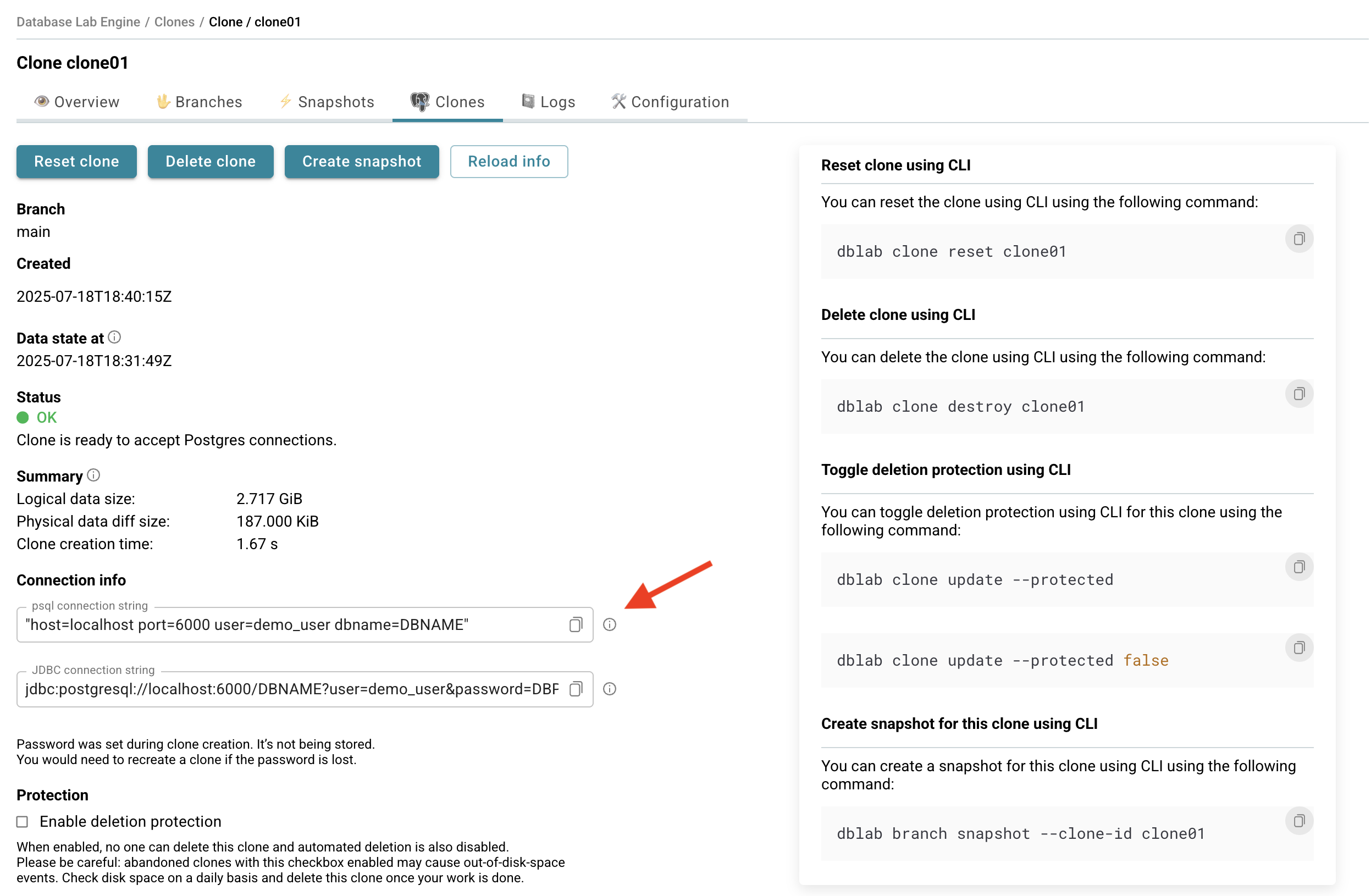
A clone in the DBLab UI, ready for connections 1.67 seconds after it was requested (a 2.7 GiB demo database). How it works
DBLab and Bytebase, side by side
| Question | DBLab | Bytebase |
|---|---|---|
| What it is | Thin clones of a full-size PostgreSQL database, used to run a schema change on real data before it ships. DBLab does not write, order or deploy migrations. docsdocs 2 | Database change and access governance for people and AI agents. Change management covers SQL review, risk-based approvals, UI or GitOps workflows, batch changes across database groups and data rollback. Access control and audit are separate parts of the product. 14 |
| Runs the change on full-size data | YesDB Migration Checker applies pending migrations to a full-size clone in CI and collects statistics from the run. docs | PartlyA rollout can run the change on a test database first, then on production, but that database is one you provide; the sources we reviewed do not describe making a full-size copy. For PostgreSQL, three review rules run EXPLAIN to dry-run DML and check affected or inserted rows. 245 |
| Lock and downtime risk | YesMeasured on the clone: the checker fails a migration that holds a dangerous lock longer than a limit, 10 seconds by default. docs | PartlyPredicted from the SQL, not measured. PostgreSQL rules flag a CREATE INDEX without CONCURRENTLY, a CHECK constraint without NOT VALID and a NOT NULL added to an existing column. Risk levels come from statement types only. 27 |
| Static review and lint rules | NoNone. DBLab runs the change; it does not lint SQL. docs | YesSQL Review: the pricing page counts 200+ rules, on every plan; 47 rules on the rules reference list PostgreSQL support. Rules are grouped into policies per environment or project. Errors block a rollout; warnings do not. 2313 |
| Writing, versioning and deploying migrations | NoNot provided. Keep your migration tool; a clone is an ordinary PostgreSQL server that any tool can connect to. docs | YesA Plan holds the change and its targets; a Rollout runs it stage by stage, for example test then production. Changes come from the UI or from Git (GitOps), as versioned migrations or as declarative, state-based schema files. 4513 |
| Approvals and audit trail | NoNot a change-approval system. DBLab EE adds SSO, user management and audit for access to clones. docs | YesCustom approval flows of one or more steps, each needing a role, chosen by conditions on environment, project, engine, SQL type, affected rows and risk level. The pricing page lists the approval workflow on Enterprise only; audit log retention is 7 days on Pro and unlimited on Enterprise. 6713 |
| Rollback | Not provided for production. On a clone, reset returns the data to the snapshot, so a migration can be run again. docs | Prior backup saves the rows changed by UPDATE or DELETE in a bbdataarchive schema in your own database; rollback SQL is generated from it in one click. An UPDATE needs a primary key, and DDL and DML cannot be mixed. Schema changes are rolled back from the changelog or with schema sync. 89 |
| CI integration | The checker runs in CI; the documented example uses GitHub Actions. Any pipeline can also create clones through the API or CLI. docsdocs 2 | SQL Review runs in pull requests with documented examples for GitHub Actions, GitLab CI, Azure DevOps and Bitbucket Pipelines. The job calls a Bytebase server with a service account; by default it reports findings without failing the build. 10 |
| Open source and hosting | YesOpen source under Apache 2.0, self-hosted in any cloud or on-premises. docs | PartlySource is on GitHub under the MIT license, except enterprise directories and plan-enablement code, which need a paid subscription for production use. Self-host with Docker, or use Bytebase Cloud, hosted in Google Cloud US. 11121416 |
Pricing
| Product | Plan | List price | Notes |
|---|---|---|---|
| DBLab | DBLab Engine | Free | Open source, Apache 2.0; you run it |
| DBLab | DBLab SE | From $62/month | Billed hourly by machine size, plus your own cloud costs; 2,000 GiB limit; single user |
| DBLab | DBLab EE | Custom | Annual contract, from $0.2662 per 100 GiB per hour; unlimited database size, SSO |
| Bytebase | Community | Free | Up to 20 users, 10 database instances; self-hosted or Cloud 1113 |
| Bytebase | Pro | $20 per user/month | 10 database instances, Google and GitHub SSO, groups; Cloud only 1113 |
| Bytebase | Enterprise | No public price | Custom users and instances, custom approval, data masking, SCIM; yearly subscription, 14-day trial 13 |
List prices on 18 Nov 2026. The billing units differ, so this is not a total-cost comparison. Bytebase Pro is priced per user, and Community and Pro each include 10 database instances. DBLab SE is billed hourly by machine size. DBLab pricing
Using DBLab with Bytebase
The two cover different steps of the same change. A developer opens a pull request with a migration. In CI, DB Migration Checker runs it on a full-size DBLab clone and fails it if it holds a dangerous lock too long, while Bytebase SQL Review lints the same files. After merge, Bytebase routes the change through approval and rolls it out environment by environment, with prior backup for data changes. DBLab does not deploy anything, so Bytebase or another migration tool still ships the change.
Questions
- Is Bytebase open source?
- Partly. The repository on GitHub is under the MIT license, except source in directories named enterprise and code that controls feature, permission, role and plan enablement. That code is under the Bytebase Enterprise license, which allows development and testing but needs a paid subscription for production use. 121416
- Does Bytebase test a migration on production-size data?
- Its review rules check the SQL against a policy, and for PostgreSQL three of them run EXPLAIN to dry-run DML and estimate affected or inserted rows. A rollout can apply the change to a test database before production; that is a database you connect, and the sources we reviewed do not describe Bytebase making a copy of production data. DBLab gives you a full-size clone to run it on. 235
- What does Bytebase cost?
- Community is free for up to 20 users and 10 database instances. Pro is $20 per user per month, Cloud only, with 10 instances. The pricing page shows no amount for Enterprise; it is a yearly subscription with a 14-day trial. 1113
- Can I use DBLab and Bytebase together?
- Yes. Run the migration on a DBLab clone in CI to see its duration and locks on real data, and let Bytebase review, approve and deploy it. DBLab does not write or deploy migrations, so it does not replace Bytebase. 24
- Which PostgreSQL versions does Bytebase support?
- PostgreSQL 12 and later, including Amazon Aurora PostgreSQL and AlloyDB, through a built-in driver. The docs give setup steps for self-managed servers, Amazon RDS and Aurora, Google Cloud SQL, Azure Database for PostgreSQL, Supabase and Neon. 17
- Does Bytebase have an MCP server?
- Yes. AI assistants such as Claude Code, Codex and VS Code connect with OAuth. A workspace access policy sets the limit: read-only by default, or read-write, where an assistant can propose a change that follows the project's review and rollout flow. 15
Try a clone before you install anything
The public demo runs DBLab Engine: open it with the token demo-token, create a clone and connect to it. DBLab Engine is open source, so the next step is a machine of your own.
Sources
- Bytebase docs: what is Bytebase
- Bytebase docs: SQL review rules
- Bytebase docs: SQL review in the change workflow
- Bytebase docs: change workflow
- Bytebase docs: move a schema change from test to prod
- Bytebase docs: custom approval
- Bytebase docs: Risk Center
- Bytebase docs: data rollback
- Bytebase docs: schema rollback
- Bytebase docs: SQL Review CI
- Bytebase docs: self-host vs Cloud
- Bytebase LICENSE file
- Bytebase pricing
- Bytebase repository on GitHub
- Bytebase docs: Model Context Protocol (MCP)
- Bytebase LICENSE.enterprise file
- Bytebase docs: connect to PostgreSQL
These pages compare what each product does for PostgreSQL; other databases and the rest of the stack are out of scope. What we say about the other product comes from its own documentation, pricing page, changelog or source repository, read on the date shown; each row cites its source. "Not documented" means we did not find it in those sources, not that the product cannot do it. Prices are list prices and the billing units differ, so they are not a total-cost comparison. Product names are trademarks of their owners. Found a mistake? Tell us and we will correct the page.
More comparisons
- Atlasrun a change on real data vs plan and lint it
- Flywaytest on a full-size clone, deploy with migrations
- Liquibaserun a change on a clone, ship it with changelogs
- pg-schema-diffplan an online change, then run it on a clone
- pgrolltest a change on a clone, then roll it out
- Sqitchdeploy and revert scripts, tested on a clone
- Squawklint migration SQL, then run it on a clone
- All comparisons