DBLab vs Liquibase
run a change on a clone, ship it with changelogs
Liquibase tracks, versions and deploys schema changes from changelogs. DBLab, open source under Apache 2.0, runs the changelog on a full-size clone first.
What DBLab adds to Liquibase
Each point pairs what our documentation says with what the Liquibase documentation says. Follow the links and check.
Runs the migration on full-size data
DBLabDB Migration Checker applies pending migrations to a full-size clone in CI and collects statistics from the run. docs
LiquibaseLiquibase update-sql prints the SQL an update will run so you can inspect it; its docs say the command does not check SQL for correctness and does not anticipate deployment errors. Liquibase runs changes on the database you point it at. 6
Open source and self-hosted
DBLabDBLab Engine is open source under Apache 2.0 and runs in any cloud or on-premises. docs
Run it again from the same state
DBLabOn a clone, reset returns the data to the snapshot, so a migration can be run again. docs
LiquibaseLiquibase rollback, rollback-to-date and rollback-count are in every edition. Undoing a single changeset or a single deployment (rollback-one-changeset, rollback-one-update) is Liquibase Secure only. 7
Measures the locks a migration holds
DBLabThe checker fails a migration that holds a dangerous lock longer than a limit, 10 seconds by default. docs
Short answer
Liquibase writes, orders and deploys schema changes: changesets in SQL, XML, YAML or JSON changelogs, preconditions, rollback commands and an update-sql preview, with policy checks and drift reports in the commercial Liquibase Secure. DBLab does none of that. It gives you a full-size thin clone of a PostgreSQL database where a change can be run to see how long it takes and which locks it holds. The two fit together: run the changelog against a clone in CI, then let Liquibase deploy it.
What Liquibase does that DBLab does not
- Liquibase is the change process itself: changesets in a changelog, a DATABASECHANGELOG table that records what ran, update, rollback and preview commands. DBLab covers none of these steps.
- Rollback commands (rollback, rollback-to-date, rollback-count) and their SQL previews are in every edition, including Community.
- Supports PostgreSQL 12 to 18, with connection guides for PostgreSQL on Amazon RDS, Aurora PostgreSQL, Azure Database for PostgreSQL and Google Cloud SQL.
- Liquibase Secure adds policy checks on changelogs before deploy, such as warnings on dropped tables and changed data types, and drift detection with dashboards.
- Liquibase Community is free to use in production; each release moves to Apache 2.0 two years after it ships.
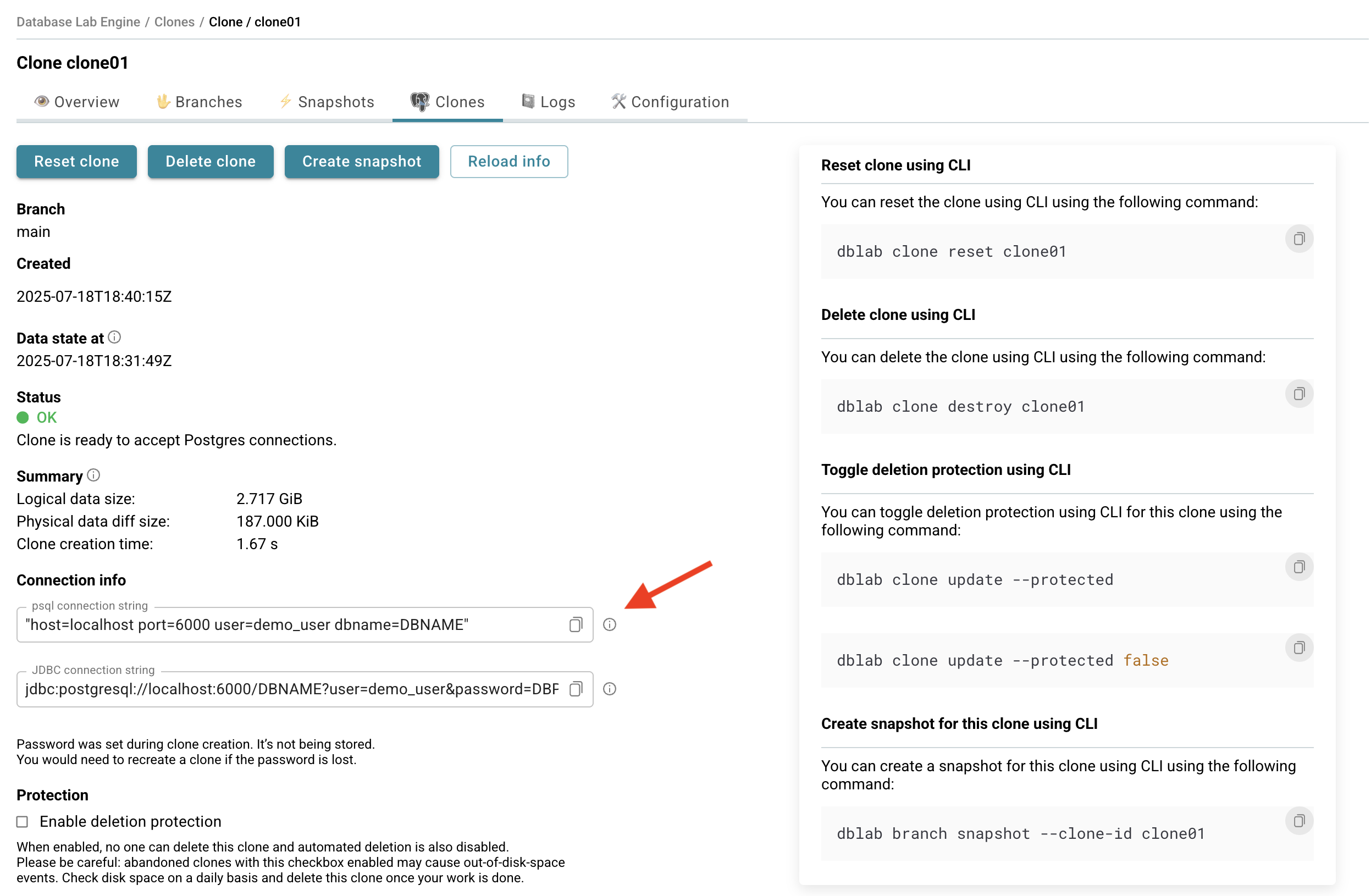
What you get
A clone in the DBLab UI, ready for connections 1.67 seconds after it was requested (a 2.7 GiB demo database). How it works
DBLab and Liquibase, side by side
| Question | DBLab | Liquibase |
|---|---|---|
| What it is | Thin clones of a full-size PostgreSQL database, used to run a schema change on real data before it ships. DBLab does not write, order or deploy migrations. docsdocs 2 | A tool to track, version and deploy database schema changes. Liquibase Community is the free edition. Liquibase Secure is the commercial edition, sold as Change Automation, Change Governance (policies) and Change Intelligence (deployments, drift and history). 3211 |
| Runs the change on full-size data | YesDB Migration Checker applies pending migrations to a full-size clone in CI and collects statistics from the run. docs | Not documentedNot documented in the sources we reviewed. update-sql prints the SQL an update will run so you can evaluate it; the docs say it does not check SQL for correctness and does not anticipate deployment errors. Liquibase runs changes on whatever database you point it at. 6 |
| Lock and downtime risk | YesMeasured on the clone: the checker fails a migration that holds a dangerous lock longer than a limit, 10 seconds by default. docs | Not documentedNot documented in the sources we reviewed. The policy checks we read warn about data loss and type changes (ChangeDropTableWarn, ChangeDropColumnWarn, ChangeTruncateTableWarn, ModifyDataTypeWarn); none of them is described as a check for table locks. 814 |
| Static review and lint rules | NoNone. DBLab runs the change; it does not lint SQL. docs | YesPolicy checks inspect changelogs, changesets and SQL before a change deploys; each triggered check returns the exit code set for its severity, which can stop a pipeline. Default checks include warnings on dropped tables and columns, changed data types and Postgres reserved keywords in object names. They are a Liquibase Secure feature: the pricing page lists Change Governance as none for Community. 8132 |
| Writing, versioning and deploying migrations | NoNot provided. Keep your migration tool; a clone is an ordinary PostgreSQL server that any tool can connect to. docs | YesChanges are changesets in a changelog written in SQL, XML, YAML or JSON. Liquibase records deployed changesets in the DATABASECHANGELOG table. Preconditions such as tableExists or rowCount decide whether a changeset runs, and update-sql previews the SQL before update. 456 |
| Approvals and audit trail | NoNot a change-approval system. DBLab EE adds SSO, user management and audit for access to clones. docs | Not documentedNot documented in the sources we reviewed as an approval workflow. Change Intelligence, on the Team, Business and Enterprise plans, shows deployments, policy outcomes, drift, failures and change history; role-based access control is listed on Business and Enterprise. 211 |
| Rollback | Not provided for production. On a clone, reset returns the data to the snapshot, so a migration can be run again. docs | rollback, rollback-to-date and rollback-count, each with a -sql preview, are in all editions including Community. rollback-one-changeset and rollback-one-update, which undo a single changeset or deployment, are Liquibase Secure only. 7 |
| CI integration | The checker runs in CI; the documented example uses GitHub Actions. Any pipeline can also create clones through the API or CLI. docsdocs 2 | The liquibase/setup-liquibase GitHub Action installs Community or Secure (version 4.32.0 or later) on a runner. In Liquibase Secure, a drift run can be marked as failed when drift meets a --drift-severity threshold. 109 |
| Open source and hosting | YesOpen source under Apache 2.0, self-hosted in any cloud or on-premises. docs | PartlyCommunity is a CLI you run yourself; Liquibase Secure adds a server hosted inside your own network. Since 5.0 (announced September 30, 2025) Community is under the Functional Source License: free in production, but third parties may not commercialize it in competition with Liquibase; each release reverts to Apache 2.0 after two years. Earlier releases stay Apache 2.0. 1311 |
Pricing
| Product | Plan | List price | Notes |
|---|---|---|---|
| DBLab | DBLab Engine | Free | Open source, Apache 2.0; you run it |
| DBLab | DBLab SE | From $62/month | Billed hourly by machine size, plus your own cloud costs; 2,000 GiB limit; single user |
| DBLab | DBLab EE | Custom | Annual contract, from $0.2662 per 100 GiB per hour; unlimited database size, SSO |
| Liquibase | Community | Free | Functional Source License since 5.0, Apache 2.0 after two years 12 |
| Liquibase | Secure Starter | No public price | Companies under $1B revenue; 250 database targets; Change Automation and Change Governance, no Change Intelligence or RBAC 2 |
| Liquibase | Secure Team | No public price | 500 database targets; adds Change Intelligence 2 |
| Liquibase | Secure Business | No public price | 750 database targets, RBAC, premium support with 24/7 SLA 2 |
| Liquibase | Secure Enterprise | No public price | 2,000 database targets, RBAC, premium support with 24/7 SLA 2 |
List prices on 18 Nov 2026. The billing units differ, so this is not a total-cost comparison. Each Liquibase Secure plan requires a Professional Services package. Secure plans are sized by database targets, with more capacity available on every plan; DBLab SE is billed by machine size. DBLab pricing
Using DBLab with Liquibase
The two cover different steps of the same change. A developer adds a changeset to the changelog and opens a pull request. In CI, a job creates a DBLab clone through the API or CLI and runs liquibase update against it, so the team sees how long the change takes and which locks it holds on full-size data; reset returns the clone to its snapshot for the next run. After merge, Liquibase deploys the changelog to production and records it in DATABASECHANGELOG. DBLab does not deploy anything.
Questions
- Is Liquibase open source?
- Releases before 5.0 are under Apache 2.0. Starting with 5.0, announced on September 30, 2025, Liquibase Community is under the Functional Source License: you can use and modify it in production, but third parties cannot commercialize it in competition with Liquibase. Each release reverts to Apache 2.0 two years after it ships. Liquibase Secure is commercially licensed. 13
- Does Liquibase test a migration on production-size data?
- The sources we reviewed do not describe that. update-sql prints the SQL an update would run, and the docs say it does not anticipate deployment errors. Liquibase runs changes on the database you point it at, so it can run against a DBLab clone. 6
- What does Liquibase cost?
- Community is free. The four Liquibase Secure plans, Starter, Team, Business and Enterprise, are each quoted, sized by database targets, and require a Professional Services package. Starter is for companies under $1B in revenue. 2
- Can I use DBLab and Liquibase together?
- Yes. A DBLab clone is an ordinary PostgreSQL server, so a CI job can run liquibase update on a clone to see duration and locks on full-size data, then Liquibase deploys the same changelog to production. DBLab does not write or deploy migrations, so it does not replace Liquibase. 410
- Which Liquibase edition has policy checks and drift detection?
- Liquibase Secure. The pricing page lists Change Governance (policies) on all Secure plans and Change Intelligence (deployments, policy outcomes, drift and history) on Team, Business and Enterprise, and none of the three for Community. 29
- Which PostgreSQL versions does Liquibase support?
- PostgreSQL 12 through 18. The docs also have connection guides for PostgreSQL on Amazon RDS, Amazon Aurora PostgreSQL, Azure Database for PostgreSQL and Google Cloud SQL for PostgreSQL. 12
Try a clone before you install anything
The public demo runs DBLab Engine: open it with the token demo-token, create a clone and connect to it. DBLab Engine is open source, so the next step is a machine of your own.
Sources
- Liquibase blog: Liquibase Community for the future (FSL)
- Liquibase pricing
- Liquibase repository on GitHub
- Liquibase Community docs: what is a changelog
- Liquibase Community docs: preconditions
- Liquibase Community docs: update-sql
- Liquibase docs: rollback commands
- Liquibase Secure docs: default policy checks
- Liquibase Secure docs: drift detection
- setup-liquibase GitHub Action
- Liquibase Secure docs: introduction
- Liquibase Secure docs: connect Liquibase with PostgreSQL
- Liquibase Secure docs: severity and exit codes in policy check automation
- Liquibase Secure docs: policy checks library
These pages compare what each product does for PostgreSQL; other databases and the rest of the stack are out of scope. What we say about the other product comes from its own documentation, pricing page, changelog or source repository, read on the date shown; each row cites its source. "Not documented" means we did not find it in those sources, not that the product cannot do it. Prices are list prices and the billing units differ, so they are not a total-cost comparison. Product names are trademarks of their owners. Found a mistake? Tell us and we will correct the page.
More comparisons
- Atlasrun a change on real data vs plan and lint it
- Bytebasetest a change on real data, then deploy it
- Flywaytest on a full-size clone, deploy with migrations
- pg-schema-diffplan an online change, then run it on a clone
- pgrolltest a change on a clone, then roll it out
- Sqitchdeploy and revert scripts, tested on a clone
- Squawklint migration SQL, then run it on a clone
- All comparisons