DBLab vs Flyway
test on a full-size clone, deploy with migrations
Flyway by Redgate applies versioned SQL migrations, with undo and drift checks in paid editions. DBLab runs them on a full-size clone and resets it for the next run.
What DBLab adds to Flyway
Each point pairs what our documentation says with what the Flyway documentation says. Follow the links and check.
Runs the migration on full-size data
DBLabDB Migration Checker applies pending migrations to a full-size clone in CI and collects statistics from the run. docs
FlywayFlyway runs migrations on the database you point it at. Its example pipeline migrates a CI database built from scratch, then an acceptance environment you provision, which may be a copy of production. 10
Run it again from the same state
DBLabOn a clone, reset returns the data to the snapshot, so a migration can be run again. docs
Open source and self-hosted
DBLabDBLab Engine is open source under Apache 2.0 and runs in any cloud or on-premises. docs
Measures the locks a migration holds
DBLabThe checker fails a migration that holds a dangerous lock longer than a limit, 10 seconds by default. docs
FlywayFlyway Enterprise Redgate rules flag DROP TABLE, DROP COLUMN, data type changes and TRUNCATE in the SQL text. The sources we reviewed do not describe measuring the locks a migration takes. 9
Short answer
Flyway writes, orders and deploys schema changes: versioned and repeatable migrations in SQL, Java or scripts, recorded in a schema history table. Paid editions add undo migrations, dry run scripts, Redgate code review rules, drift detection and change reports. DBLab does none of that. It gives you a full-size thin clone of a PostgreSQL database where a migration can be run to see how long it takes and which locks it holds. The two fit together: run the migrations on a clone in CI, then let Flyway deploy them.
What Flyway does that DBLab does not
- Flyway is the migration process itself: versioned, repeatable and baseline migrations, applied in order and recorded in the schema history table. DBLab covers none of these steps.
- The Flyway engine is open source under Apache 2.0, and Flyway Community, with the CLI, API and Flyway Desktop, is free.
- PostgreSQL 12 to 18 is listed for both foundational and advanced capabilities, 9.0 to 11 for migrations, with Amazon RDS, Aurora, Google Cloud and Azure variants.
- Code review with SQLFluff in every edition; Enterprise adds the Redgate rules, such as Drop Table, Drop Column, Modify Data Type and TRUNCATE, and custom regex rules.
- Enterprise adds drift detection, change reports and generated versioned and undo scripts from Redgate's comparison engine, with PostgreSQL among the supported platforms.
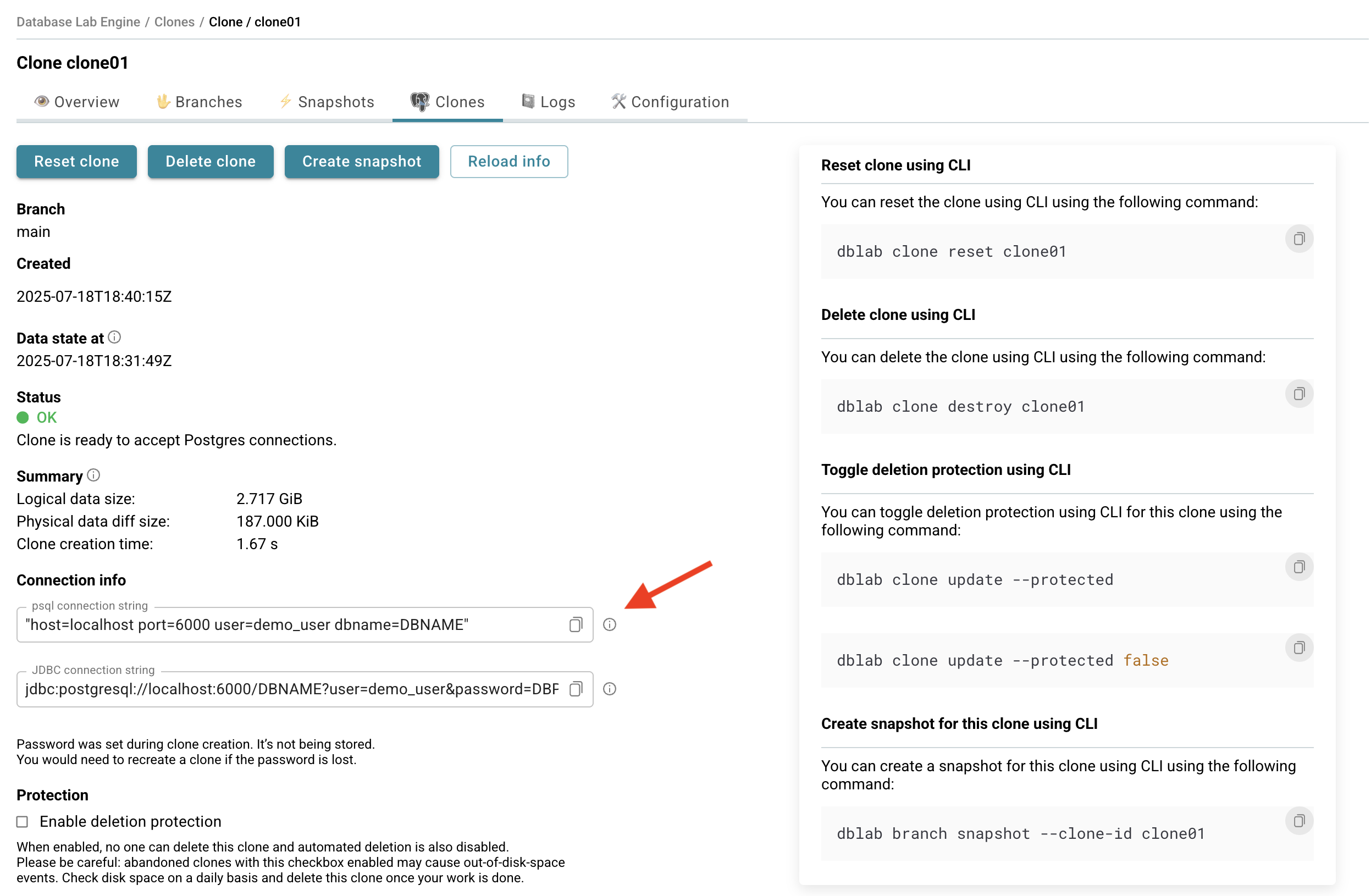
What you get
A clone in the DBLab UI, ready for connections 1.67 seconds after it was requested (a 2.7 GiB demo database). How it works
DBLab and Flyway, side by side
| Question | DBLab | Flyway |
|---|---|---|
| What it is | Thin clones of a full-size PostgreSQL database, used to run a schema change on real data before it ships. DBLab does not write, order or deploy migrations. docsdocs 2 | Database change management by Redgate. The open-source engine applies migrations; Redgate sells editions with a GUI and more features. The product pages list Community, for individuals and education, and Enterprise, which adds policy-as-code, drift detection and audit-ready change control. 1211 |
| Runs the change on full-size data | YesDB Migration Checker applies pending migrations to a full-size clone in CI and collects statistics from the run. docs | PartlyFlyway runs migrations on the database you point it at. The example pipeline migrates a CI database built from scratch, then an acceptance environment that you provision, which the docs say may be a copy of production (consider masking the data). Check DryRun (Teams and Enterprise) previews changes; Enterprise change reports show what will change on the target. 1063 |
| Lock and downtime risk | YesMeasured on the clone: the checker fails a migration that holds a dangerous lock longer than a limit, 10 seconds by default. docs | Not documentedNot documented in the sources we reviewed. The Redgate rules flag statements such as DROP TABLE, DROP COLUMN, data type changes and TRUNCATE, and RG05 asks for indexes in a separate script because index creation is time and resource intensive; none is described as a check for table locks. 9 |
| Static review and lint rules | NoNone. DBLab runs the change; it does not lint SQL. docs | YesCode review runs SQLFluff rules in every edition and regex rules in Enterprise. Enterprise adds the Redgate rules RG01 to RG23, 20 of which apply to PostgreSQL; the Enterprise page counts 95+ rules. Teams and Enterprise can fail a pipeline on rule violations. 5893 |
| Writing, versioning and deploying migrations | NoNot provided. Keep your migration tool; a clone is an ordinary PostgreSQL server that any tool can connect to. docs | YesMigrations are versioned, repeatable or baseline, most often written in SQL, also Java or scripts. Versioned migrations run once in order. Teams and Enterprise also offer state-based projects, and Enterprise generates migration scripts with Redgate's comparison engine. 753 |
| Approvals and audit trail | NoNot a change-approval system. DBLab EE adds SSO, user management and audit for access to clones. docs | Not documentedNot documented in the sources we reviewed as an approval workflow in Flyway. The example pipeline puts an approval gate in your CI/CD system, where the change report and deployment script are reviewed; Enterprise change reports are described as the DBA review packet. 103 |
| Rollback | Not provided for production. On a clone, reset returns the data to the snapshot, so a migration can be run again. docs | Undo migrations undo the versioned migration with the same version. The undo command needs Teams or Enterprise; Enterprise can generate undo scripts for every versioned migration. 763 |
| CI integration | The checker runs in CI; the documented example uses GitHub Actions. Any pipeline can also create clones through the API or CLI. docsdocs 2 | The docs have example pipelines for Azure DevOps, Bitbucket, GitHub, GitLab, Jenkins, Octopus Deploy and TeamCity. 10 |
| Open source and hosting | YesOpen source under Apache 2.0, self-hosted in any cloud or on-premises. docs | YesThe engine on GitHub is under Apache 2.0; Redgate's editions with a GUI and extra capabilities are not part of the open-source project. Community is free; Teams and Enterprise are licensed per user. You run it yourself. 11213 |
Pricing
| Product | Plan | List price | Notes |
|---|---|---|---|
| DBLab | DBLab Engine | Free | Open source, Apache 2.0; you run it |
| DBLab | DBLab SE | From $62/month | Billed hourly by machine size, plus your own cloud costs; 2,000 GiB limit; single user |
| DBLab | DBLab EE | Custom | Annual contract, from $0.2662 per 100 GiB per hour; unlimited database size, SSO |
| Flyway | Open source engine | Free | Apache 2.0; API and CLI 1112 |
| Flyway | Community | Free | For individuals and education; CLI, API and Flyway Desktop; SQLFluff code review 25 |
| Flyway | Enterprise | Not listed | Get in touch with sales; per user; 28-day free trial; undo, drift detection, change reports, Redgate rules 3413 |
List prices on 18 Nov 2026. The billing units differ, so this is not a total-cost comparison. The documentation still lists a Teams edition, licensed per user, with undo and dry run; the current product pages list only Community and Enterprise. DBLab pricing
Using DBLab with Flyway
The two cover different steps of the same change. A developer adds a versioned migration and opens a pull request. In CI, a job creates a DBLab clone through the API or CLI and runs flyway migrate against it, so the team sees how long the migration takes and which locks it holds on full-size data, while Flyway code review lints the same files. Reset returns the clone to its snapshot for the next run. After merge, Flyway applies the migration to production. DBLab does not deploy anything.
Questions
- Is Flyway open source?
- The engine is. The flyway/flyway repository is under Apache 2.0, and the README says Redgate's editions with a GUI and additional capabilities are not part of the open-source project. Flyway Community is free; Teams and Enterprise are commercial and licensed per user. 11213
- Which Flyway edition has undo migrations and code analysis?
- Undo and dry run scripts need Teams or Enterprise. Code review with SQLFluff is in every edition; the Redgate rules and custom regex rules are Enterprise. Drift detection and change reports are Enterprise only. 56
- Does Flyway test a migration on production-size data?
- Flyway runs migrations on the database you point it at; its example pipeline includes an acceptance environment you provision, which may be a copy of production. A dry run previews changes, and Enterprise change reports show what will change on the target. A DBLab clone can be that copy. 1063
- What does Flyway cost?
- The open-source engine and Flyway Community are free. The product pages we reviewed do not list an Enterprise price; Redgate asks you to get in touch, licenses it per user and offers a 28-day free trial. 2313
- Which PostgreSQL versions does Flyway support?
- PostgreSQL 12 to 18 is supported for both foundational and advanced capabilities, and 9.0 to 11 for foundational migrations only. The list also includes Amazon RDS for PostgreSQL, Aurora PostgreSQL, Google Cloud for PostgreSQL and Azure PostgreSQL Flexible Server. 14
- Can I use DBLab and Flyway together?
- Yes. A DBLab clone is an ordinary PostgreSQL server, so a CI job can run flyway migrate on a clone to see duration and locks on full-size data, then Flyway applies the same migrations to production. DBLab does not write or deploy migrations, so it does not replace Flyway. 710
Try a clone before you install anything
The public demo runs DBLab Engine: open it with the token demo-token, create a clone and connect to it. DBLab Engine is open source, so the next step is a machine of your own.
Sources
- Redgate Flyway product page
- Flyway Community
- Flyway Enterprise
- Flyway Enterprise free trial
- Flyway docs: feature summary
- Flyway docs: commands
- Flyway docs: migrations
- Flyway docs: code review rules
- Flyway docs: Redgate SQLFluff rules library
- Flyway docs: example CI/CD pipelines
- Flyway repository on GitHub
- Flyway docs: the Flyway engine, OSS and Redgate
- Flyway docs: commercial licensing FAQ
- Flyway docs: supported databases and versions
These pages compare what each product does for PostgreSQL; other databases and the rest of the stack are out of scope. What we say about the other product comes from its own documentation, pricing page, changelog or source repository, read on the date shown; each row cites its source. "Not documented" means we did not find it in those sources, not that the product cannot do it. Prices are list prices and the billing units differ, so they are not a total-cost comparison. Product names are trademarks of their owners. Found a mistake? Tell us and we will correct the page.
More comparisons
- Atlasrun a change on real data vs plan and lint it
- Bytebasetest a change on real data, then deploy it
- Liquibaserun a change on a clone, ship it with changelogs
- pg-schema-diffplan an online change, then run it on a clone
- pgrolltest a change on a clone, then roll it out
- Sqitchdeploy and revert scripts, tested on a clone
- Squawklint migration SQL, then run it on a clone
- All comparisons